concept Windows in category ruby

This is an excerpt from Manning's book Ruby in Practice.
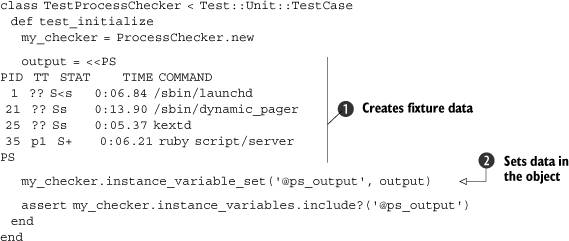
This is one situation where implementing a fixture makes sense. If you create standard data for the object to use instead of making a call to ps every time, you can ensure your tests will run the same everywhere (even on Windows!). Take a look at the revised version of the test in listing 2.10.
In this instance, we fill in some fixture data, which has static output from a run of the ps command
. This data is then fed into the object via instance_variable_set
. Now we can run this test on any platform (even though Windows will complain that it can’t find ps) and it should behave the same way, because we now have a set of fixture data to work from.
Installing Ruby is a fairly trivial affair, but there are a few things worth paying attention to. You will want to use gems extensively, and not all installations include RubyGems by default. You may also want to use gems that take advantage of C extensions (for example, MySQL drivers and the Mongrel web server), which require that you have the proper development libraries and tools. In this appendix, we provide you with the simplest steps for installing a fully functional and up-to-date version of Ruby 1.8 on Windows, Mac OS X, and Linux.

This is an excerpt from Manning's book Flexible Rails: Flex 3 on Rails 2.
Because Flex 3 targets one platform (Flash 9), we don’t have to worry about platform compatibility issues. The Write Once, Run Anywhere (WORA) dream that client-side Java programmers had—before it turned into “write once, debug everywhere”—can finally be realized, but with Flex. Flex achieves what previous technologies such as Java applets failed miserably in attempting: applications that feel like desktop applications, but which run inside any modern web browser on Windows and Mac.
First you need to install the software you’ll need to follow along with the rest of the book. The goal of this book is to save you time in getting up to speed using Flex and Rails together. As such, I don’t want to say “install everything” and leave you to your own devices figuring out what to install. But I don’t know whether you’re using Windows, OS X, or Linux, and whether you want to use Flex Builder (on Windows or OS X only) or the Flex SDK. So that you get a book that is as tailored to your needs as possible, this iteration has four sections—but you only need to read two of them:
Listing 2.4. config\database.yml
# MySQL (default setup). Versions 4.1 and 5.0 are recommended. # # Install the MySQL driver: # gem install mysql # On MacOS X: # sudo gem install mysql -- --with-mysql-dir=/usr/local/mysql # On Windows: # gem install mysql # Choose the win32 build. # Install MySQL and put its /bin directory on your path. # # And be sure to use new-style password hashing: # http://dev.mysql.com/doc/refman/5.0/en/old-client.html development: adapter: mysql encoding: utf8 database: pomodo_development username: pomodo password: YourPasswordHere host: localhost # Warning: The database defined as 'test' will be erased and # re-generated from your development database when you run 'rake'. # Do not set this db to the same as development or production. test: adapter: mysql encoding: utf8 database: pomodo_test username: pomodo password: YourPasswordHere host: localhost production: adapter: mysql encoding: utf8 database: pomodo_production username: pomodo password: YourPasswordHere host: localhost