concept observer in category rxjs

This is an excerpt from Manning's book RxJS in Action.
At this point, this stream remains dormant and nothing has actually happened, until there’s a subscriber (or observer) that listens for it. This is very different from Promises, which execute their operations as soon as they’re created. Instead, streams are lazy data types, which means that they execute only after a subscriber is attached. In this case, the value 42, which was lifted into the stream context, navigates or propagates out to at least one subscriber. After it receives the value, the stream is completed:
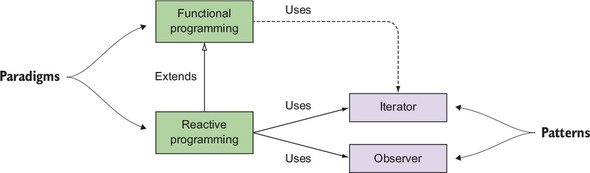
Every piece of data that’s emitted and processed through an observable needs a destination. In other words, what was the purpose of capturing and processing a certain event? Observers are created within the context of a subscription, which means that the result of calling subscribe() on an observable source is a Subscription object. Because observables operate synchronously or asynchronously, the consumer of an observable must in some way support the inversion of control that also happens with callbacks. This is consistent with its push-based mechanism. That is, because you don’t know when a DOM element, for instance, will fire an event or when the result of an AJAX call will return, observables must be able to call into or signal the observer structure that more data is available by using the observer’s next() method, as illustrated in figure 2.13. This mechanism is directly inspired in the iterator and observer patterns. An iterator doesn’t know (or care) about the size of the data structure it’s looping over or if it will ever end; it only knows whether there’s more data to process.

Listing 7.5. Calling the error method on observers when an exception is thrown
const computeHalf = x => Math.floor(x / 2);
Rx.Observable.of(2,4,5,8,10)
   .map(num => {
      if(num % 2 !== 0) {
        throw new Error(`Unexpected odd number: ${num}`);       #1
      }
      return num;
   })
   .map(computeHalf)
   .subscribe(
     (next) => console.log(val),
     (error) => console.log(`Caught: ${err}`),                  #2
     () => console.log('All done!');

    );