concept React in category rxjs

This is an excerpt from Manning's book RxJS in Action.
Now you’re probably wondering, am I allowed to choose only one? Or can I combine them into the same code base? The beauty behind all this is that you can use all of them together. Many prominent figures in our industry have attested to this. In other words, RxJS doesn’t force on you a certain style of development or design pattern to use—it is unopinionated. Thankfully, it also works orthogonally to most libraries. As you’ll see later on, it’s a simple matter in most cases to adapt an existing event stream such as a DOM event handler into an observable. The library provides many operators for such operations baked directly into it. It will even support unusual design patterns such as those you’ll see when you use a library like React or Redux (which you’ll see in the last chapter).
Fortunately, the most difficult hurdle is the mental leap of changing paradigms, and you’ve successfully done that because you’re here now. At a high level, the goal of this chapter is to teach you the components of an RxJS + React + Redux (what we call the 3R) architecture. Understanding how 3R works can be overwhelming at first, and a basic understanding of React and Redux would help you going through this chapter, but it’s certainly not necessary. To make all this content easier to digest, we’ve laid out the following roadmap:
You’ll explore the basic parts of React and Redux with simple examples (if you have previous experience with these technologies, feel free to skip these beginning sections and jump directly into section 10.4).
Other contenders in the reactive web space are Cycle.js and Yolk. One reason for choosing React over these alternatives is that we wanted to give you a chance to see how RxJS works with a framework that doesn’t directly use RxJS from the ground up. Although React and Redux certainly have properties that make using them with RxJS relatively straightforward, they were not designed explicitly to use it, thus making it a more interesting integration problem when it comes to understanding how to design around interfaces that don’t quite fit—this is what RxJS in the wild is all about!
React components are the main unit of modularity and are remarkably simple. Most React components need only a render() method, which tells the React subsystem what to do when a component must be rerendered or drawn on the page. You’ll need to know about only a couple of functions of the top-level API in this chapter. The first one is called React.createElement(); this is the method that’s called when you want React to instantiate a particular element, like a <span> or a <div>. Here’s what the top-level API looks like for this method:
React.createElement(
  type,
  [props],
  [...children]
)
It effectively creates a virtual version of a DOM (also known as a shadow DOM) element, which is used by React to render your application on the screen. Now, this call on its own doesn’t draw anything onscreen; that’s the job of the particular renderer that you’re using, like ReactDOM, for example. Aside from render(), ReactDOM offers other APIs for removing or unmounting elements and finding DOM nodes in the HTML tree. These aren’t used that often. Here’s a simple “Hello RxJS!” application with empty properties:
Obviously, there are a number of ways that you could implement a seemingly simple text field. So, for those of you who are new to React, this may seem a bit of a roundabout way to render such a simple system. But what you’ve seen is the basis of a powerful concept. By combining RxJS streams with React components, you can create components that not only update in real time but also largely separate the concerns of the application. You achieve this separation by isolating UI changes and letting React efficiently manage the process, so that none of the components need to have an awareness of any others. This separation of the concerns and immutability of the data structures also prevents new features from interfering with existing ones.
So far, you’ve seen how to render DOM components and how to change them. But most of the dynamic interaction with rich state UIs originates from handling user input. User interfaces that use React that need to both handle user input and then render some output on another component based on those interactions present a slight challenge to RxJS’s unidirectional flow (producers to consumers). The challenge is that these observables are then inextricably linked to the state of a single component but need to make changes somewhere else.
Take the standard search engine example you implemented in chapter 5. You learned that standard inputs can be used as event sources for data that comes from, say, keyup events. In the DOM, you could use a query to get the search bar element, attach the corresponding event handlers, and begin listening for events. After the stream is set up, you could begin subscribing to it from other parts of the application. If you were to implement the input box and the output list as React components, then the search results list, located somewhere else on the page, could subscribe to those events and update as new results arrive. But this becomes an issue in a feed-forward (unidirectional) model like React. Why? Remember that state flows smoothest when it’s travelling to child components and not so well when it’s going back upstream and into another isolated component, as shown in figure 10.3.
Figure 10.3. React components for search. Two different React components have no direct way of communicating because each component’s state is completely encapsulated within the component. So you must resort to using external, shared variables or patterns such as an event bus.
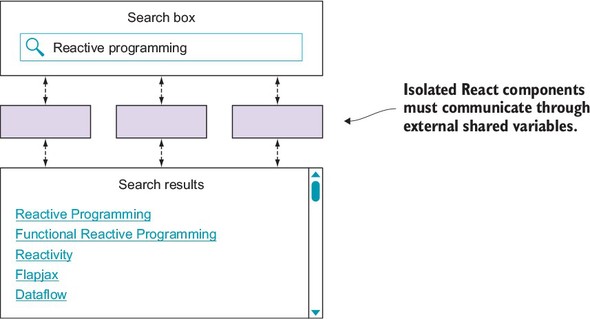
When two isolated components need to communicate, this inevitably leads to sharing state variables, and you end up losing all the benefits of encapsulating state changes into a single downstream pipeline. This is important to understand. As you can see from figure 10.3, React components are good about keeping state to themselves, and it’s meant to flow only downward. Therefore, if you modeled the search bar and the search results widgets as React components, there wouldn’t be a direct way of sharing the data that originates in one with the other. This is a philosophical decision of React that states that components should never know (or care) whether another component is stateless or stateful.
In React, because components are composed hierarchically, it’s difficult for one state to update another if those components don’t have a direct parent/child relationship (as we did with the AccountBalance earlier), as shown in figure 10.4.