concept custom route in category sails

This is an excerpt from Manning's book Sails.js in Action.
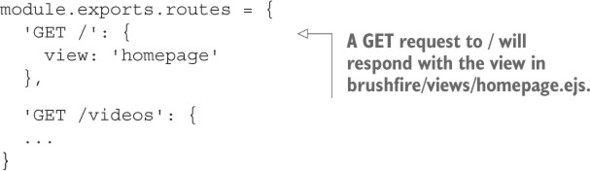
In chapter 3, you used a generator to remove the custom default route to the home-page and to create an index.html file in brushfire/assets/index.html. From that point on, when a browser user-agent made a GET request to / (slash), Sails first looked for a custom route in brushfire/config/routes.js, and, not finding one, it next looked in brushfire/assets/ for an index.html file. This index.html file became the entry page of your application. You’re now going to use a hybrid approach where Sails will return to a server-rendered entry page on the backend, with Angular controlling the contents of the page on the frontend. So, you’ll override brushfire/assets/index.html by adding a custom route with the same route address. Open /brushfire/config/routes.js, and add the following code.
You’ll notice that the route doesn’t trigger a controller action but instead contains a dictionary that identifies the view that should be rendered when the route is triggered. Therefore, custom routes can trigger both controller actions and views. In your custom route, a GET request to / will now trigger the display of a homepage template located in the brushfire/views/homepage.ejs folder. Why are you using the .ejs file extension? EJS is one of many view engines you can use with Sails.