concept homepage in category sails

This is an excerpt from Manning's book Sails.js in Action.
Let’s take a closer look at the actual request and the response. Click the Sign Up button in the upper navigation bar of the homepage, and you should see the signup page, as illustrated in figure 1.3.
Before you lift Sails, take a look at the requirements for the login action. In figure 9.2, the homepage contains a sign-in form that can trigger a PUT request to /login that passes in either an email address or a username along with a password as parameters.
You’ll update the route so that instead of directly loading the view, the route will trigger an action. For example, the homepage view will have an action named show-HomePage. In this action, you have greater flexibility to expand the logic than you do in a custom route. You can now determine if the user is authenticated by checking req.session.userId and sending locals that will trigger the display of the appropriate markup in the view. Figure 9.6 illustrates an example of this process.
Figure 9.6. When the user makes a GET request to /, it will be matched with a custom route that triggers an action that determines the user’s authenticated state and sends the appropriate locals to the layout view, which are then added to the frontend via an Angular controller and displayed based on a directive in the view.
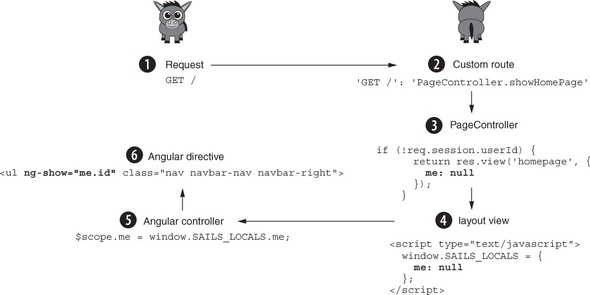
When a user-agent makes a GET request to localhost:1337
, it’s matched in a custom route
, which triggers a showHomePage action
in the PageController. The action will determine that req.session.userId is null and render the homepage view
with locals set to null. The frontend (controller) will read the authenticated state from the window dictionary and set an internal $scope.me property
. Finally, an Angular directive will then display the appropriate form
based on the user’s authenticated state.
You’ll spend the remainder of this chapter adding a custom action for each page in Brushfire that will correspond with your existing custom routes. This action will contain the logic to determine the user’s authenticated state and send locals to the view based on that state. Let’s start with the root route and the homepage view.
The signup page doesn’t have an authenticated state. Therefore, if the user is authenticated and attempts to make a GET request to /signup, you want the browser redirected to the root route or homepage. In Sublime, open brushfire/config/routes.js, and make the following changes to the route.
Example 9.25. Altering the signup route to trigger the showSignupPage action
module.exports = {
  'GET /': 'PageController.showHomePage',
  ...
  'GET /signup': 'PageController.showSignupPage',
...
Notice that you’re no longer passing static locals to the homepage view and instead routing the request directly to the showSignupPage action. In Sublime, open brushfire/api/controllers/PageController.js, and add the following action.
Notice that you’re no longer passing static locals to the homepage view. Instead, a GET request to the root (for example, /) triggers the showHomePage action of the page controller. So let’s create the action. In Sublime, open brushfire/api/controllers/PageController.js, and add the following action.