concept jQuery in category sails

This is an excerpt from Manning's book Sails.js in Action.
On the other hand, if you send a POST request using $.post() syntax, jQuery will bundle the parameters in the request’s body:
This chapter will help you answer those questions and explore in detail ways Sails can deliver frontend assets in a web application. Many great libraries and frameworks work well with Sails. We chose jQuery as a proxy for client-side DOM manipulation tools and Angular as a proxy for client-side frameworks. In this chapter, we’ll use both to demonstrate how to integrate DOM manipulation tools like jQuery and client-side JavaScript frameworks into the static asset pipeline. The remaining chapters will focus on Angular on the frontend.
Currently, the initial videos are hardcoded in the markup. Instead, you’ll load them from an array using jQuery. Let’s first alter the markup a bit to account for the classes you’ll need to select elements with jQuery. In Sublime, open brushfire/assets/videos/index.html and alter the list-of-videos section to reflect the code that follows.
Example 3.8. Adding classes to make selecting elements easier in jQuery
...
<!-- LIST OF VIDEOS -->
<section class="the-list-of-videos col-md-12">
  <div class="loading">Loading videos...</div>
  <ul>
    <!-- VIDEO DATA INSERTED HERE AS HTML -->
  </ul>
</section>
...
Notice that you add an element for your loading state. You also remove the static YouTube video iframes, which will be replaced by dynamic-loading iframes via jQuery.
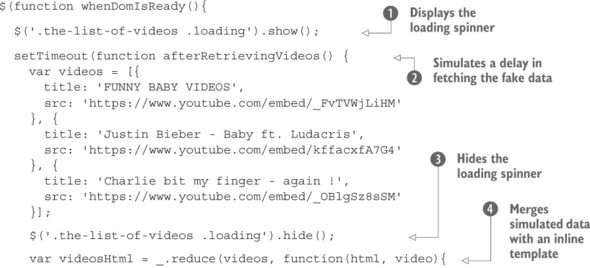
Next, create a new file for the jQuery code that will load the video list. In Sublime, create a new file named brushfire/assets/js/videos-page.js and add the jQuery shown in the next listing.