concept requirement in category sails

This is an excerpt from Manning's book Sails.js in Action.
To better understand controller actions (or simply actions), let’s focus on an example: a signup form. When the user submits the form, a POST request is sent to /user/signup. When it arrives at the Sails backend, the request is automatically compared with your app’s configured routes. The first matching route will be triggered, which then calls a controller action. It’s the job of this controller action to fulfill the requirements of this request. Recall that actions are just JavaScript functions and that controllers are just dictionaries of related actions.
The requirements for the example endpoint ('POST /user/signup') are to create a new user, store that user in your database, and respond with the status code of 200 to indicate success. If anything goes wrong, you’ll want to respond with a different status code, depending on what issue or error occurred. These requirements seem simple, but they bring up some fundamental questions about Sails:
In this chapter, we’ll differentiate between pivots based on market forces versus a lack of frontend decision making. We’ll take a systematic approach to identify requirements based on the needs of the client and how that translates to the needs of the frontend and backend. We’ll also cover best practices for refactoring when changes are unavoidable, as well as some tricks you can use to make your applications easier to maintain.
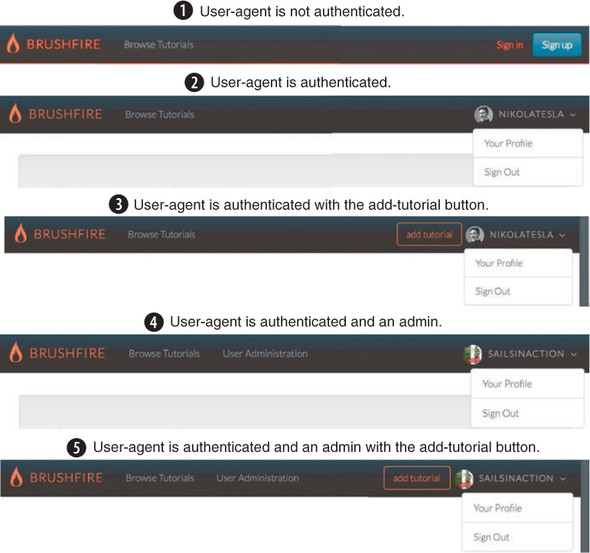
We now have a requirement to incorporate tutorials into Brushfire. We also have a requirement to allow all users to access user profiles. Finally, we have a requirement to add standalone signup and sign-in pages. These requirements make new demands of the navigation view to display different markup based on the condition of the user–agent, as illustrated in figure 11.1.
Figure 11.1. The navigation markup has five basic states based on the conditions of the user-agent: unauthenticated
, authenticated without the add tutorial button displayed
, authenticated with the add-tutorial button displayed
, authenticated and an admin
, and authenticated and an admin with the add tutorial button displayed
.
The display of the administration link will remain unchanged. What has changed is the way in which Sign Up and Sign In now function. Based on Chad’s requirements, we’ve created two new wireframes that coincide with standalone views for the sign-in and signup pages. Links to each page are now on the navigation bar when the user-agent is unauthenticated, as depicted in figure 11.2.
“I didn’t know you needed me to respond with the username. It’s going to take some time to change the backend to make that kind of response.” This response indicates a lack of wireframes to identify requests and the requirements of those requests. A market-based pivot involves user-driven feature changes that aren’t always predictable. A pivot based on a lack of frontend decision making, however, is highly predictable and preventable. What do we mean by a lack of frontend decision making? At this point, we can’t imagine implementing a backend without first examining the front-end for requests and requirements of those requests. This examination leads to decisions on how to design the backend to meet the requirements of the frontend. It also results in deciding what the application will look like and how it will function before fully implementing the backend. Making these decisions isn’t easy because choosing to do one thing means that we’re choosing not to do another thing.