concept room in category sails

This is an excerpt from Manning's book Sails.js in Action.
.subscribe() joins a requesting WebSocket to the update, destroy, add, and remove rooms of one or more record(s) of a model. Behind the scenes, Sails takes care of creating and managing these room names. For example, a room named sails_model_user_33: update is the update action room for a user record with an id of 33. You don’t have to remember the room names. Instead, you pass various pubsub methods, including .subscribe(), the id of a record or records you want to join the room. .unsubscribe() removes a requesting WebSocket from the room of one or more record(s) of a model.
Each chat is associated with a particular video and a particular user. When the rendered brushfire/views/show-video.ejs view loads, you display any existing chats associated with the video. You’ll need a way to send new chats created for the period between page refreshes. To accomplish this task, you’ll send an event as each new chat is created. But you don’t want to send the event to all connected WebSockets. Instead, you want to limit sending the event to those WebSockets that are currently on the video player page of a particular video record. You can accomplish this by creating a room unique to that video record, joining the WebSockets that are on this page to the room, and then sending an event to the room. But what room are we talking about?
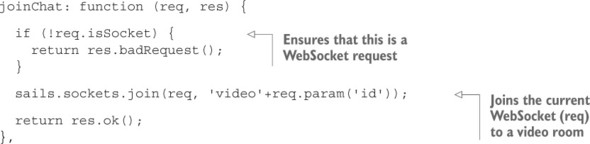
Socket.io uses the metaphor of a room to group WebSockets together. From the backend, you can then broadcast messages to the room. You can also subscribe and unsubscribe WebSockets from the room. There’s no need to create a room explicitly. The first user who joins a room automatically creates the room in the process. So, by loading the show-video view, the frontend Angular controller makes a PUT request to /videos/2/join. This, in turn, triggers the joinChat action, which you’ll implement now. In Sublime, open brushfire/api/controllers/VideoController.js, and add the following code to the joinChat action.
The sails.sockets.join() method is one of the low-level methods Sails provides that allows realtime communication with the frontend. The method has two required arguments: a WebSocket and a roomName. The WebSocket refers to the client WebSocket that made the request, and the roomName is the name of the room to join. You’ll pass the req dictionary as the first argument, and use a combination of the word video with the id of the video record to create a unique room name for each video as the second argument. Now that you’ve joined the WebSocket to the video room, let’s set up a mechanism for sending a chat.