concept state in category sails

This is an excerpt from Manning's book Sails.js in Action.
In this book, we’ll use both the terms sockets and WebSockets to refer to a two-way, persistent communication channel between a Sails app and a client. Communicating with a Sails app via WebSockets is really a form of AJAX, in that it allows a web page to interact with the server without refreshing. But sockets differ from traditional AJAX in two important ways: First, a socket can stay connected to the server for as long as the web page is open, allowing it to maintain state. Traditional AJAX requests, like all HTTP requests, are stateless. Second, because of the always-on nature of the connection, a Sails app can send data down to a socket at any time, whereas AJAX allows the server to respond only when a request is made.
We’re now well into the implementation of an identity, authorization, personalization, and access control system designed to make the world a safe place for cat videos. A user can now set up and manage their identity. The Brushfire frontend is also personalized based on a user’s simulated authenticated status. In this chapter, you’ll create the authentication component and replace the simulated state with a user’s actual authenticated state. The goal of this authentication, along with the work done in chapters 6–8, is to require a Brushfire user to be authenticated to add video content. That way, if a user violates the content policy and posts a forbidden dog video, our investor can disable the account with extreme prejudice. In chapter 10, we’ll wrap up the client’s requirements by locking down our backend API based on the user’s authenticated state.
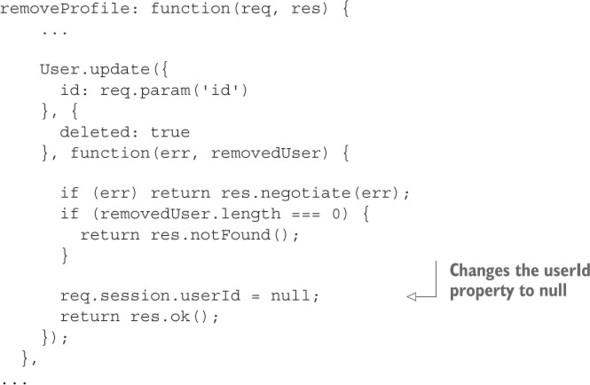
When you soft-delete a user, their authenticated state should be changed. In Sublime, open brushfire/api/controllers/UserController.js, and set the user’s authenticated state in the removeProfile controller action, as shown here.
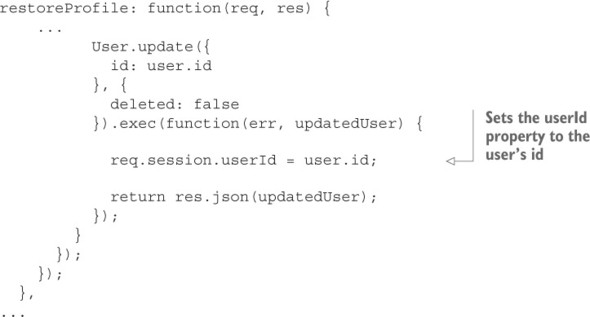
Similarly, when the user is restored, a user’s authenticated state should change. In Sublime, open brushfire/api/controllers/UserController.js, and set the user’s authenticated state in the restoreProfile controller action as follows.