concept test in category sails

This is an excerpt from Manning's book Sails.js in Action.
In Sails, like most web frameworks, you can write code that works with the database that can be run from anywhere from tests to custom scripts. But for most apps, the overwhelming majority of the data-manipulation code you write will be triggered as the result of incoming web requests.
In this final chapter, we’ll address deploying Brushfire into the wild. This will require us to choose a deployment destination, and will include deploying and configuring a remote PostgreSQL instance for our main database and a Redis instance for our session and WebSocket stores. We’ll separate Brushfire into three different environments: development, production, and test. We’ll use the environments as a way to configure Brushfire separately based on one of the three environments chosen. Testing is a vital step in the development process. We’ll show you how to set up tests for endpoints and model methods. We’ll wrap up the chapter with a discussion of the most prevalent security vulnerabilities and steps you can take to protect against them.
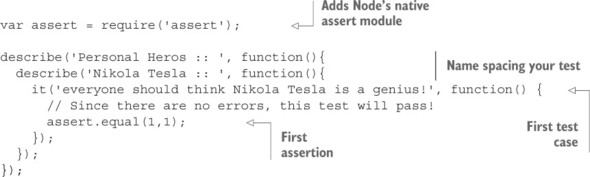
Before diving into an actual test of Brushfire, we thought it would be easier to start our discussion with a simple test case that isolates the structure of a test. In the brushfire/test/ folder, create a subfolder named integration/. This is where you’ll aggregate your tests. Create the test in Sublime by creating a file named brushfire/test/ integration/test.js and adding the following code.
The assert library is a core module in Node. One of the purposes of the library is to provide methods that you can use to test whether something is true. The describe() method is a way to group multiple tests under a particular namespace often referred to as a test suite. You can also nest the describe() method in another describe() to create subgroups. Observing the results of a test will provide greater clarity on how and why you use these methods. The it() method creates an actual test case. Anything that throws an error within the it() method will cause the test to fail. Execute your first test by heading to the terminal window and typing the following from the command line:
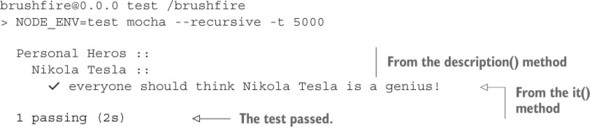
~/brushfire $ npm testThe result of the test should look similar to the following.
Looking at the log results of the test, you can see that your first test passed.