concept view in category sails

This is an excerpt from Manning's book Sails.js in Action.
On the other hand, browser user-agents rely on some combination of HTML, CSS, and JavaScript for the frontend user interface. Instead of visiting an app store, users download the frontend app (or web page) by visiting a URL in their browser. If you plan to build an app that will support web browsers, then you need to decide how each page or view in the app will be delivered and ultimately rendered. There are two basic approaches: single-page apps (SPAs) and hybrid web applications. Figure 1.18 illustrates the two kinds of requests you can expect to see when building an SPA.
This approach is not too different from the approach for native apps because it relies on client-side rendering. The only real difference is that in addition to exposing endpoints for fetching data and triggering backend logic, Sails may also need to deliver static assets: files like images, HTML templates, client-side JavaScript, and style sheets. Using this approach, Sails delivers the initial HTML page as a static asset, and then client-side JavaScript (running in the browser) is responsible for making intermediate changes to the view via AJAX requests to the backend API. Wholesale page navigation, if any, is managed by special client-side JavaScript code (sometimes called a client-side router).
The second approach, a hybrid web application, relies (at least to some degree) on server-side rendering. That means Sails is responsible for preparing personalized, dynamic web pages on the backend from special templates called views and then delivering the personalized HTML to the browser. Figure 1.19 illustrates the kinds of requests you can expect to see if you’re building a hybrid web application.
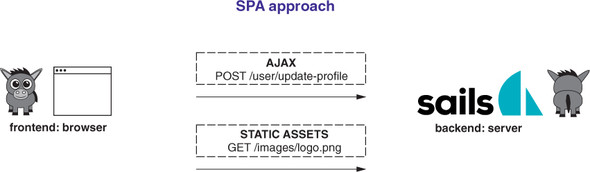
Table 11.1. The five categories of views in Brushfire
Category
Description
Views
Navigation bar The overall top bar navigation has states that dictate how the markup is displayed. navigation.ejs signin.ejs signup.ejs signout.ejs Search, browse, and administration Brushfire includes a search view, browse view, and our existing administration view. homepage.ejs browse-tutorials-list.ejs administration.ejs Profile The user profile takes on a new level of importance in the way users can find content created by other users. profile.ejs profile-followers.ejs profile-following.ejs edit-profile.ejs Tutorial and video Tutorials aggregate one or more videos. tutorials-detail.ejs tutorials-detail-new.ejs tutorials-detail-edit.ejs show-video.ejs tutorials-detail-video-new.ejs tutorials-detail-video-edit.ejs Other A catchall for all other views. layout.ejs restore-profile.ejs password-recovery-email.ejs password-recovery-email-send.ejs password-reset.ejs Some of the views within each of these categories can display different content based on the condition of the user-agent, including
Sometimes it makes sense to go back and aggregate views into folders for better organization. Let’s look at an example relating to the password-recovery system to aggregate some views. We decided to organize all the views related to password recovery in a views subfolder named password-recovery. The following listing illustrates the way you reference the path to a view in res.view().
Figure 11.15 shows the model and attributes for each state of the view.
Figure 11.15. The model and attribute for each view are shown if they’re not duplicated in the user-agent authenticated and tutorial-owner views
. Therefore, all the attributes in the unauthenticated view
are referenced in
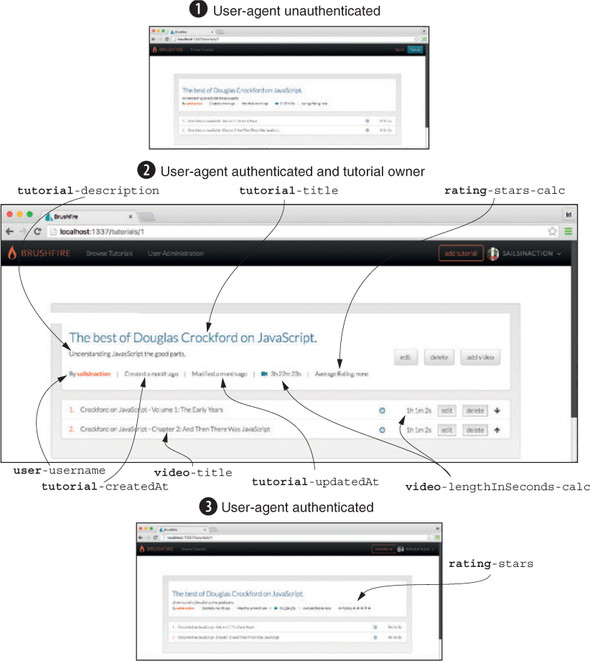
Next, let’s look at the requests for each state of the view in figure 11.16.
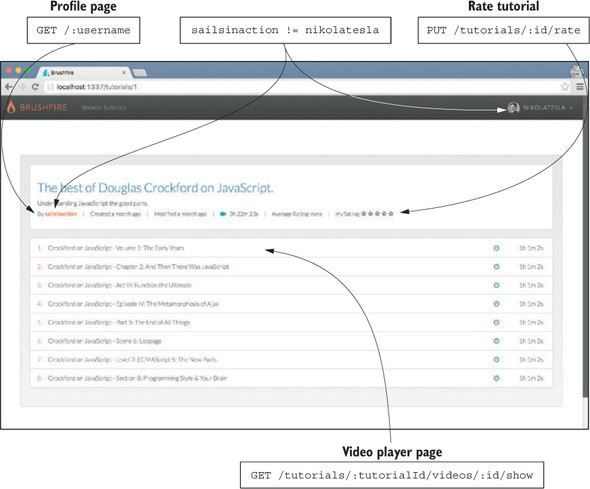
To control the contents of the view based on the user-agent’s state, you’ll employ a combination of the me dictionary you’ve been using and a new me.isMe property, which, if true, indicates that the user-agent is authenticated as the creator of the tutorial. As shown in figure 11.16, when a user-agent is not authenticated, a read-only view of the tutorial detail page is displayed
When a user-agent is authenticated but isn’t the owner of the tutorial, a read-only version of the page is again displayed but with an added myRating request, similar to figure 11.17.