concept setting in category sbt

This is an excerpt from Manning's book sbt in Action.
A setting in sbt is just a value. This could be the name of the project or the version of Scala to use.
First move the gitHeadCommitSha task to be defined on the build itself. To do this, you add the in ThisBuild qualifier to the task key when you define the setting. Modify the existing setting in build.sbt to look as follows:
gitHeadCommitSha in ThisBuild := Process("git rev-parse HEAD").lines.headNow that the task is attached to the build itself, you only have to define it once, but all projects can make use of its results. This is great for files/settings that are truly shared across all projects, because it means sbt will execute the task only once for all projects that request the value. Also it means that you don’t have to redefine the setting in every project that needs it. By default, if sbt doesn’t find a task/setting for a key in a given project, it will fall back to task/settings defined in the build itself.
The makeVersionProperties setting is still defined on the root project. Let’s move that to the common project. Modify your build.sbt by copying and pasting the makeVersionProperties setting into the settings() block of the common project. The new common project definition should look like this:
Settings are the bread and butter of sbt builds. They’re the mechanism by which you configure sbt to perform the work you need for your build. sbt reads all the settings defined in your build at load time and runs their initializations, which produce the final setting values used for your build. In chapter 2, you configured the name of the used-kittens project with the setting shown in figure 3.1.
In sbt, every key has one and only one type. Any value placed into a setting must match the exact type. This prevents mismatched data from being passed around the build.
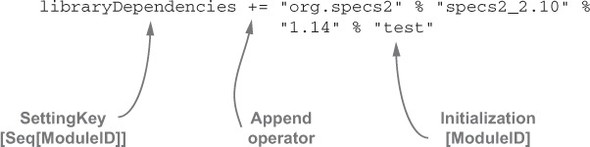
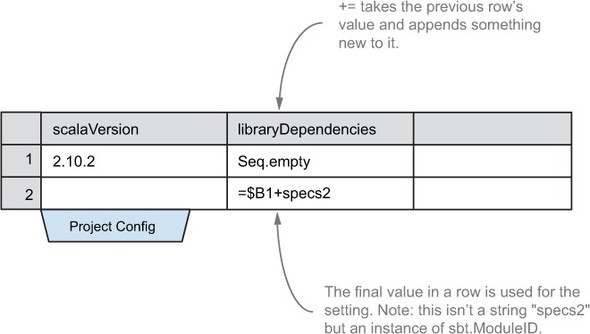
You’re going to adapt the build from chapter 2 to include another testing library. In chapter 2 you needed to write a test for your new project. To do so, you added the specs2 testing library with the setting in figure 3.4 to get figure 3.5.