concept source in category sbt

This is an excerpt from Manning's book sbt in Action.
Later, at a different company, there was another automated build system. His name was Fred.[1] His job was to build the product, in all of its various combinations. Every day, he would come in, check out all of the sources, and enter the numerous commands to build the product. And then he’d do it again, with a slightly different combination for a slightly different version of the build. If any of the builds failed, it was his job to tell the developers that something went wrong. This was his job. Fred was an intelligent person and, frankly, he deserved better—and indeed he could have spent his time much better elsewhere. In fact, he ended up writing his own build system to automate the builds. And he could have saved the time taken to write and maintain that as well if he’d used a standard build tool.
Let’s look at each individually, starting with sources.
Let’s take a look at the sources task and determine the source layout conventions from there. A simple run of inspect tree sources reveals the structure shown in figure 4.2.
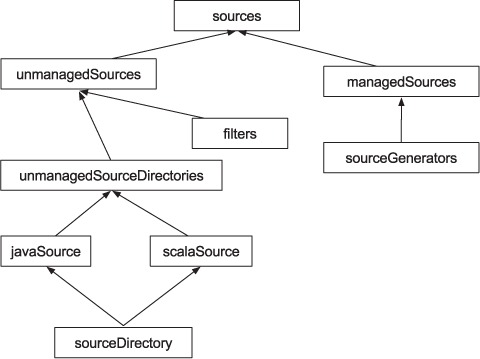
Unmanaged sources make use of a set of file filters and a default set of directories to produce the sequence of source files for the project. As shown in the dependency tree, the directories defined by the javaSource and scalaSource settings make up the set of directories where sbt looks for sources. Let’s see what these settings are by default (the convention):
> show javaSource
[info] <project-dir>/src/main/java
> show scalaSource
[info] <project-dir>/src/main/scala
By default, the set of sources that sbt uses for a project comes from the src/main/java directory and the src/main/scala directory. These directories are scanned for files, and those files that pass the default filters are used in compilation.
Of course, there are the production source files, also referred to as the compile sources. Those are the .scala and .java files that will be compiled and whose binary artifacts will go into production. In addition, many projects also contain compile resources, which are files that are also needed at runtime but don’t need to be compiled. Well-known examples include .properties and .xml files to configure your logging system. These resources aren’t compiled but are copied or included alongside the binary artifacts. When the context allows for it, we won’t always make a precise distinction between sources and resources and sometimes refer to both as sources.
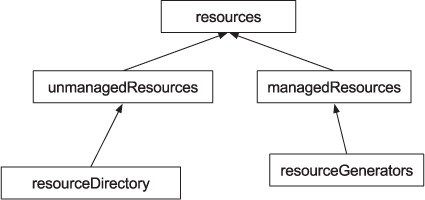
Similar to how sbt has a sources task to collect sources, there’s a corresponding resources task, which collects all the files that should be available at runtime. Figure 4.3 gives you a look at the dependency tree for the resources task. We don’t include the full output of inspect tree resources for space reasons.
Similar to the sources task, the resources task comprises two sets of files: