concept configuration in category scala

This is an excerpt from Manning's book sbt in Action.
For a number of projects (through the use of a parent POM), which allows you to define configurations for multiple projects
<root>/
   <build.sbt files defining total project structure>
   project/
      <sbt plugin files + .scala helper libraries>
      target/
         <your sbt build, compiled>
   common/
       <build.sbt with configuration specific to the common project>
       src/
          main/
              scala/
                  <scala/java code for production>
              resources/
                  <files that should be on the classpath for the common
            project>
          test/
              scala/
                   <scala/java code for unit testing>
              resources/
                    <files that should be on the classpath when unit
            testing
    target/
      <generated files from the build for the 'common' project.
  analytics/
     <similar to common>
  web/
     <similar to common>
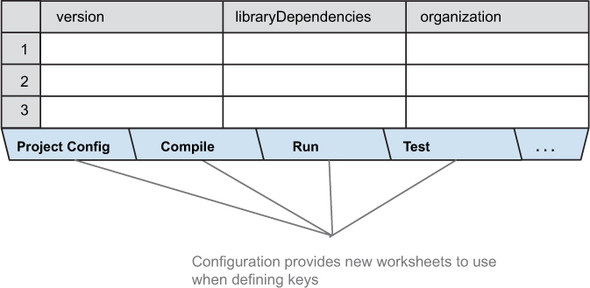
Configurations are namespaces for keys. These are similar to adding new pages to a spreadsheet. They allow the same key, or column, to be reused to serve different purposes. sbt comes with several configurations in the default build; see table 3.1.
To return to the spreadsheet analogy, configurations create new worksheets, as in figure 3.14.
Configurations provide consistencies between tasks within sbt. A given flow of tasks can be repeated across two different configurations. Also, tasks in one configuration can depend on tasks in another configuration. Because sbt runs all tasks in parallel by default, configurations can be used to create mirror tasks that can run in parallel.
Configurations provide one means to namespace settings and tasks, but there’s another mechanism you can use: defining with subprojects.
A wealth of configurations

This is an excerpt from Manning's book Lift in Action: The Simply Functional Web Framework for Scala.
In fact, Lift has been designed from the ground up to support these kinds of systems better than anything else. Building interactive applications should be fun, accessible, and simple for developers. Lift removes a lot of the burdens that other frameworks place on developers by mixing together the best ideas in the marketplace today and adding some unique features to give it a component set and resume that are unlike any other framework you have likely come across before. Lift brings a lot of new ideas to the web framework space, and to quote one of the Lift community members, “it is not merely an incremental improvement over the status quo; it redefines the state of the art” (Michael Galpin, Developer, eBay). This departure from traditional thinking shouldn’t worry you too much, though, because Lift does adopt tried and tested, well-known concepts, such as convention over configuration, to provide sensible defaults for all aspects of your application while still giving you a very granular mechanism for altering that behavior as your project dictates.
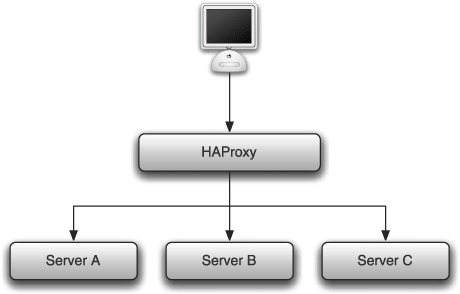
Figure 15.2 shows a typical HAProxy deployment setup. The configuration detailed here is a fairly typical proxying setup.
Figure 15.2. A typical HAProxy deployment. Web traffic connects to HAProxy, which in turn load-balances traffic to application servers inside the LAN.
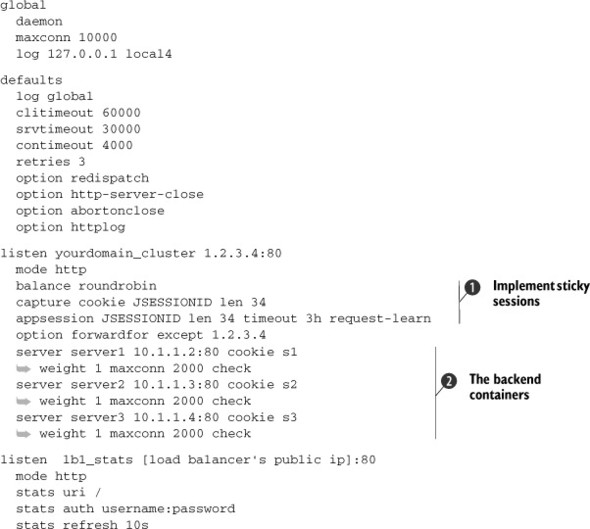
Let’s take a look at the configuration needed to implement such a setup. HAProxy takes all of its configuration options from a file called haproxy.cfg, which is typically located in /etc/haproxy/, but this is system-specific and not an absolute rule. You can achieve a simple setup as shown in the following listing.
This configuration essentially tells HAProxy that it will be dispatching requests to three backend servers with the defined IP addresses
and that it should use the JSESSIONID as an identifier to do the dispatching in a sticky manner
. The configuration also instructs HAProxy to conduct a round-robin style of load balancing to determine which server it should dispatch a new request to. There are a range of options here, and detailing them is beyond the scope of this chapter, so I heartily recommend checking the HAProxy documentation for more information on this and other parameters you can use to tune the setup for your particular requirements.