concept name in category scala
This is an excerpt from Manning's book Get Programming with Scala.
Figure 6.1 provides an example of the different components of a function in Scala. A function has two main parts: a signature that defines what it does, and an implementation that details how it does it. You can split a function signature further into a name, parameters, and a return type. Let’s review each component.
toString – By default, a toString function returns a string representing the name of the class followed by the hexadecimal representation of the memory address associated to the class instance: for example, this may look similar to “Person@1e04fa0a”. A case class redefines this method to return a string that is descriptive on the data it contains:
new Person("Tom", 25)
Person.apply("Tom", 25)
Person("Tom", 25)
Person(age = 25, name = "Tom")

This is an excerpt from Manning's book sbt in Action.
As you can see, the Gradle build files are a lot clearer and easier to read than the equivalent Maven pom.xml.[1] First you specify that you’ll be using the Java plugin; this installs a number of tasks such as compileJava and compileTestJava and jar. The name of this project is taken from the final part of the path. If your file is called /foo/bar/hello-gradle/build.gradle, the name of the project will be hello-gradle. In the previous build, you’re using external dependencies, so you need to explicitly set the repositories that you’d like to search—Maven central. And you’re using the commons-collections for your main compilation and JUnit for your test classes. For your dependencies, Gradle acts pretty much like Maven: it downloads the dependencies from the repository, caches them locally, and you’re ready to go.
Listing 3.1. Full multiproject build
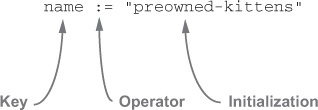
name := "preowned-kittens" // Custom keys for this build. val gitHeadCommitSha = taskKey[String]("Determines the current git commit SHA") val makeVersionProperties = taskKey[Seq[File]]("Creates a version.properties file we can find at runtime.") // Common settings/definitions for the build def PreownedKittenProject(name: String): Project = ( Project(name, file(name)) settings( version := "1.0", organization := "com.preownedkittens", libraryDependencies += "org.specs2" % "specs2_2.10" % "1.14" % "test" ) ) gitHeadCommitSha in ThisBuild := Process("git rev-parse HEAD").lines.head // Projects in this build lazy val common = ( PreownedKittenProject("common"). settings( makeVersionProperties := { val propFile = (resourceManaged in Compile).value / "version.properties" val content = "version=%s" format (gitHeadCommitSha.value) IO.write(propFile, content) Seq(propFile) } ) ) val analytics = ( PreownedKittenProject("analytics"). dependsOn(common). settings() ) val website = ( PreownedKittenProject("website"). dependsOn(common). settings() )
How to add names/meaning to parsers using the token method

This is an excerpt from Manning's book Lift in Action: The Simply Functional Web Framework for Scala.
As the name implies, functional programming languages have a single basic idea at their root: functions. Small units of code are self-contained functions that take type A as an argument and return type B as a result; this is expressed more directly in Scala notation: A => B. How this result is achieved is an implementation detail for the most part; as long as the function yields a value of type B, all is well.
<lift:auto_complete_sample.sample form="post">
  <p>Type a name here: <f:find_name /></p>
</lift:auto_complete_sample.sample>
Here the members of JsonDSL are imported into the current compilation scope, which includes a set of implicit conversions that allow you to supply regular Scala types like tuples to the JSON render method. The result of the render method is then passed to compact, which does the serialization to a string. As the name implies, the compact method will create a compacted JSON string so it takes up as little room as possible. Alternatively, if you’d prefer nicely structured output, you can replace compact with pretty, and it will render a pretty printed version of the JSON output, complete with structured spacing.
This illustration has several related points but let’s begin with the solid black duration line that goes from time marker 1 to A to 2. This line indicates the initial request coming from the user’s browser going to the server. At marker A, Lift does a bunch of processing to generate the in-memory function mapping for any bound elements and returns content to the browser with session-specific opaque GUIDs. That may sound a little cryptic, but it’s like the form processing covered in chapter 6 where each rendered <input> on a page was automatically assigned a random GUID for a name. The same is happening here, but rather than it being a form input, the GUID is passed from the client to the server so the server knows which callback function it should execute when the AJAX request is triggered by a particular user interaction.