concept product in category scala
This is an excerpt from Manning's book Get Programming with Scala.
A customer can buy one item at the time by selecting a specific product and inserting money into the vending machine. Once the vending machine receives the request, then it should check that the product is available, and the given money is enough: if all the checks are successful, then it should collect the money and release the product.
Figure 8.1 summarizes the execution flow of the interaction between a customer and the vending machine. A customer requests a product to buy. Following this operation, the vending machine should check if the product is in stock and if the money is enough to cover its cost. When rejecting the request, it should display a human-readable message explaining what went wrong. When successful, it should collect the money and release the product together with a message that acknowledges the purchase.
Figure 8.1: Summary of the execution flow for a vending machine. The customer’s request to buy a product should be satisfied if and only if the product is available and the inserted money is enough.

First of all, you need to identify the main components of your vending machine. A vending machine has a cash register containing the money collected so far and a counter for each type of product. Create a new file called VendingMachine.scala, and add the following code:
Listing 8.1: The VendingMachine class
// file VendingMachine.scala

class VendingMachine {

var chocolateBar = 0 //#A
var granolaBar = 0   //#A
var totalMoney = 0.0 //#B
}
A customer can perform one action: requesting a product by giving money in exchange. Let’s define a function called buy that takes two parameters: a String for the product and a Double for the money. It should return a human-readable message with the outcome of the request. Add the following method to your class:
This is an excerpt from Manning's book Functional Programming in Scala.
Let’s look in detail at the functions sum and product, which we place in the object List, sometimes called the companion object to List (see sidebar). Both these definitions make use of pattern matching:
def sum(ints: List[Int]): Int = ints match {
  case Nil => 0
  case Cons(x,xs) => x + sum(xs)
}

def product(ds: List[Double]): Double = ds match {
  case Nil => 1.0
  case Cons(0.0, _) => 0.0
  case Cons(x,xs) => x * product(xs)
}
As you might expect, the sum function states that the sum of an empty list is 0, and the sum of a nonempty list is the first element, x, plus the sum of the remaining elements, xs.[3] Likewise the product definition states that the product of an empty list is 1.0, the product of any list starting with 0.0 is 0.0, and the product of any other nonempty list is the first element multiplied by the product of the remaining elements. Note that these are recursive definitions, which are common when writing functions that operate over recursive data types like List (which refers to itself recursively in its Cons data constructor).
We can state the associativity law in terms of product.[5] Recall that product just combines two effects into a pair, using map2:
5 product, map, and unit are an alternate formulation of Applicative. Can you see how map2 can be implemented using product and map?

This is an excerpt from Manning's book Play for Scala: Covers Play 2.
Working with HTTP means letting the application developer make the web application aware of the different HTTP methods, such as GET, POST, PUT, and DELETE. This is different than putting an RPC-style layer on top of HTTP requests, using remote procedure call URLs like /updateProductDetails in order to tell the application whether you want to create, read, update, or delete data. With HTTP it’s more natural to use PUT / product to update a product and GET /product to fetch it.
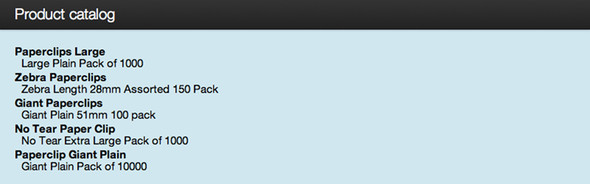
We’ll start with a simple list of products, each of which has a name and a description, shown in figure 2.1. This is a prototype, with a small number of products, so there isn’t any functionality for filtering, sorting, or paging the list.
The new finder method, which will find a product by its EAN, is a short one. Add the following to app/models/Product.scala:
object Product {
  var products = Set(
...
  def findByEan(ean: Long) = products.find(_.ean == ean)
}
This method takes the object’s Set of products (products) and calls its find method to get the requested product. Let’s look at the template.
A version of the sample application is available that also has functionality to update a product. Any additional features are left as an exercise for the reader. You’ll see how to do t--hat and more in later chapters.