concept query in category scala

This is an excerpt from Manning's book Play for Scala: Covers Play 2.
The idea behind Slick is that you use it instead of using JDBC directly or adding a complex object-relational mapping framework. Instead, Slick uses Scala language features to allow you to map database tables to Scala collections and to execute queries. With Scala, this results in less code and cleaner code compared to directly using JDBC, and especially compared to using JDBC from Java.
Anorm relies on you to build queries, so it doesn’t need to know anything about your model. Therefore, your model is simply a bunch of classes that represent the entities that you want to use in your application and store in the database, as shown in listing 5.2. These entities are the same as in chapter 2.
Note that we’ve only defined the query; we haven’t run it or accessed the database in any way. So how do we get our results?
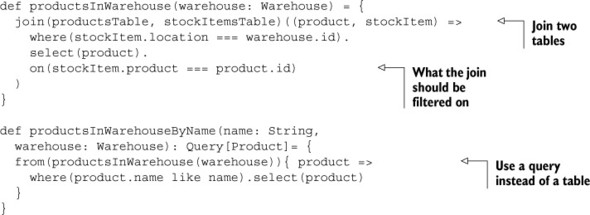
We told you that from takes a table as a parameter. We lied; it takes a Queryable. A Table is a Queryable, but so is a Query. This makes it possible to combine queries to create new queries, like creating multiple queries that filter on different fields all based on the same base query. This is useful because you can apply the don’t repeat yourself principle to queries.
The query in listing 5.13 shows one example of this.
Instead of passing a table parameter to from, we’ve given it a query (productsInWarehouse). By doing this, we’ve defined one way to filter products on whether they’re present in a specific warehouse, and we’ve reused the same filter in another query. We can now use the productsInWarehouse query as the basis for all queries that need to filter in the same way. If we decide, at some point, that the filter needs to change in some way, we only have to do it in one place.

This is an excerpt from Manning's book Lift in Action: The Simply Functional Web Framework for Scala.
In order for the application to actually do anything worthwhile, it needs to be able to persist and retrieve data. To that end, let’s add some code to the project to connect to the database and build the tables that will power the auctions. We’ll start by defining the models and generating the schema, and ultimately connect with the database to make queries and retrieve useful data.
Now that you have Squeryl-Record configured and ready, let’s reconstruct the bookstore example from chapter 10, including the relationships and queries, to use Squeryl. This will demonstrate some of the powerful features Squeryl and Record bring to the party.