concept request in category scala

This is an excerpt from Manning's book Reactive Design Patterns.
Another threat to responsiveness arises when a service that the application depends on becomes momentarily overloaded. A backlog of requests will accumulate, and while these are processed, response latencies will be much longer than normal. This situation can be avoided by employing flow control, as described in chapter 16. In the Gmail example, there are several points at which circuit breakers and flow control are needed:
In this scheme, the router must be able to forward all the streams coming from the file servers back to all the clients, meaning its network interface’s bandwidth will place an upper limit on how many bytes per second can be streamed by the entire system. Network links are becoming faster and faster, but if this streaming service is intended to serve customers on the internet, then it will reach its limit fairly soon. Therefore, you must think a bit more about the meaning of request and response in this scenario: the client sends a request, and the logical destination is the file server, not the router. The response is a video stream whose source is the file server and whose destination is the client. Although you need the router as an intermediary for the request—balancing the load across a pool of replicated file servers hosting the particular video file that is requested—you do not need to involve it in handling the response. The resulting message-flow diagram is shown in figure 15.3.
Figure 15.3. Flow of messages when applying forward flow: although the request needs to pass through the router for load balancing, the (large) response does not need to take the same route. It can travel back directly from file server to client.
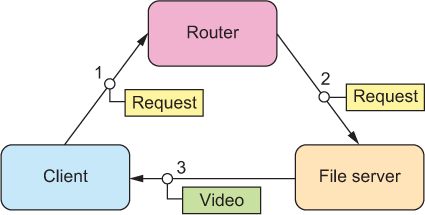
Here, the requests flow toward their destination via the shortest possible path, and the responses also do not waste any time on their way back. Because the file servers communicate directly with the clients, you are free to scale up the available computing and network resources without limit.
Listing 15.3. Untyped Akka Actors modeling request–response
object RequestResponseActors { case class Request(msg: String) case class Response(msg: String) class Responder extends Actor { def receive = { case Request(msg) => println(s"got request: $msg") sender() ! Response("got it!") } } class Requester(responder: ActorRef) extends Actor { responder ! Request("hello") def receive = { case Response(msg) => println(s"got response: $msg") context.system.terminate() } } def main(args: Array[String]): Unit = { val sys = ActorSystem("ReqRes") val responder = sys.actorOf(Props[Responder], "responder") val requester = sys.actorOf(Props(new Requester(responder)), "requester") } }You first define the message types for the request and the response, and you formulate a Responder actor that, given a request, replies with a response, printing a message to the console so you can see that something happens. Then you define a second actor—Requester—that is instantiated with the ActorRef of a responder. This requester actor first sends a request and then reacts to the reception of a response by printing a message to the console and shutting down the entire process. The main program starts up first a responder and then an associated requester. When you run this program, you will see the expected output:
got request: hello
got response: got it!
This formulation of the Request–Response pattern is enabled by an Akka-specific feature: when sending the request message, the requester’s own ActorRef is implicitly picked up by the ! (tell) operator, and the Request message is placed in an Akka-internal envelope that also carries this sender ActorRef. This is how the sender() method can access the return address within the Responder actor to send back the response. The envelopes used behind the scenes are an implementation detail that has been introduced specifically because request–response is such a widely used communication pattern.

This is an excerpt from Manning's book Play for Scala: Covers Play 2.
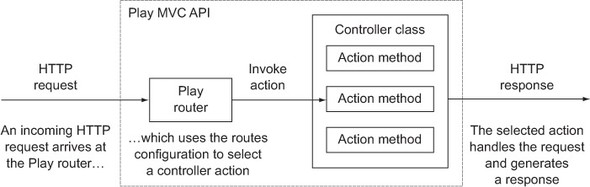
Now that we have an action that takes a parameter, we need a way to pass the parameter to the action from the request. Let’s look at how to add parameters to routes.
This code uses jQuery to run when the page has loaded and sends an Ajax GET request to the /products resource (the product list). The second parameter to the jQuery $.get function is a callback function that will be called when the request is complete. This loops over the resulting products array of EAN codes and adds a table row for each one.
Often, you don’t even need to manually perform this step. If a request has a JSON body and a Content-Type header with value of application/json, Play will do this for you automatically. Then you can immediately get a JsValue object from the request:
def postProduct() = Action { request =>
  val jsValueOption = request.body.asJson
  jsValueOption.map { json =>
    // Do something with the JSON
  }.getOrElse {
    // Not a JSON body
  }
}
This example uses the default body parser, the AnyContent parser. This parser will look at the Content-Type header and parse the body accordingly. The request.bodyasJson method returns an Option[JsValue], and it’s a Some when the request has application/json or text/json as the request content type.
You may recall from chapter 4 that an action method returns a play.api.mvc.Action, which is a wrapper for a function from a request to a result.

This is an excerpt from Manning's book Lift in Action: The Simply Functional Web Framework for Scala.
User behavior online in recent years has changed; people now spend more time than ever online, and this means they want the way they interact with online services to be more intuitive and natural. But building such rich applications has proven to be tough for many developers, and this often results in interfaces and infrastructures that aren’t really up to the job or user expectations. Lift aims to make building real-time, highly interactive, and massively scalable applications easier than it has ever been by supporting advanced features like Comet, which allow you to push data to the browser when it’s needed, without the user having to make any kind of request for it.
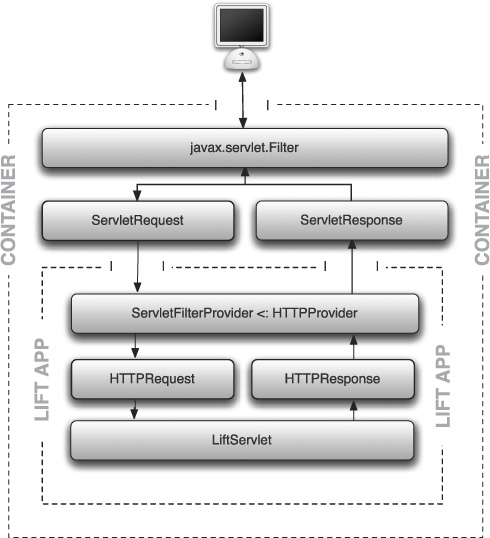
Before getting into the specifics of how to build AJAX components with Lift, let’s take a few moments to explore the actual purpose of AJAX. AJAX provides developers a technique they can use to load parts of a page on demand, typically in reaction to a user event such as the click of a button. An example that many readers have likely experienced is that of the Gmail user interface. When clicking on an email you wish to read, the browser makes a request to the server asynchronously to fetch the required content. Such techniques have several material bonuses.
import net.liftweb._, http.S, common.{Box,Full,Empty,Failure}

for {
  id <- S.param("pid") ?~ "Product ID not present in request"
  product <- Product.find(id) ?~ "Product does not exist"
} yield product