concept user in category scala

This is an excerpt from Manning's book Reactive Design Patterns.
The resources necessary to store all those emails will be enormous: hundreds of millions of users with gigabytes of emails each will need exabytes[3] of storage capacity. This magnitude of persistent storage will need to be provided by many distributed machines. No single storage device offers so much space, and it would be unwise to store everything in one location. Distribution makes the dataset resilient against local perils like natural disasters; but, more important, it also allows the data to be accessed efficiently from a larger region. For a worldwide user base, the data should be globally distributed as well. It would be preferable to have the emails of a Japanese user stored in or close to Japan (assuming that is where the user logs in from most of the time).
When users are momentarily overwhelming a service, then its response latency will rise, and eventually it will start failing. Users will receive their responses with more delay, which in turn will increase their own latency until they get close to their own limits. In the image server example in section 2.1.2, you saw how adding an explicit queue protected the client by rejecting requests that would take more than the acceptable response time to service. This is useful when there is a short spike in demand for the service. If the image database were to fail completely for several minutes, the behavior would not be ideal. The queue would fill with a backlog of requests that, after a short time, would be useless to process. A first step would be to cull the old queue entries, but the queue would refill immediately with still more queries that would take too long to process.
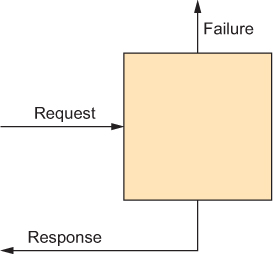
In order to stop this effect from propagating across the entire chain of user–service relationships, users need to shield themselves from the overwhelmed service during such time periods. The way to do this is well known in electrical engineering: install a circuit breaker, as shown in figure 2.12.
So far, this book has used the word user informally and mostly in the sense of humans who interact with a computer. You interact only with your web browser in order to read and write emails, but many computers are needed in the background to perform these tasks. Each of these computers offers a certain set of services, and the consumer or user of these services will in most cases be another computer that is acting on behalf of a human, either directly or indirectly.

This is an excerpt from Manning's book sbt in Action.
Per user (useful for specifying default repositories or credentials)
What is a plugin? A plugin is a set of reusable sbt settings that users can include in their build without having to copy/paste them in. Most of the time users should be able to reuse existing settings and tasks and likely tweak a few values here and there for their build. In this chapter we’ll look at how to provide those tasks, along with some recommendations as to how to set up your plugin to make it easy for the end user. You’ll write a simpler version of the Scalastyle plugin that you saw earlier.
AutoPlugin has another method that you can override, trigger, which defines under what circumstances your plugin will be activated. By default it’s noTrigger; this is the behavior you saw previously. In noTrigger mode, you force the user to explicitly enable your plugin. If you change the trigger to allRequirements, then the plugin gets automatically enabled when all of its required plugins are also enabled on the project. If you define a plugin with no requirements, but a trigger of allRequirements, it’s enabled on all projects automatically.
Use the autoenabling feature with care; it may be a bad idea to force a user to import all of your settings. But if you do use it, the user will always have the option of using disablePlugin to prevent your plugin from getting included. Generally, a trigger of allRequirements should be used for plugins that depend on and adapt other plugins. For example, the sbt-pgp plugin takes the settings defined in the IvyPlugin and adds PGP signatures to artifacts generated. Having the sbt-pgp plugin automatically included on any project using Ivy would be okay, but adding PGP settings to every project, regardless of whether or not the user wants it, may not be useful.
Let’s look a bit more at the requirements feature of AutoPlugins. What’s a requirement? It’s a set of other plugins that a plugin requires to function. Additionally, a plugin can designate plugins it won’t work with, as exclusions in the requirements. For example, if there are two competing uber jar packaging plugins, they can declare that they conflict with each other so users are unable to specify both in the same project.

This is an excerpt from Manning's book Play for Scala: Covers Play 2.
When we use the form that we defined in the controller, our goal is to collect the product details that the user entered in the HTML form and convert them to an instance of our Product model class. This is only possible if the data is valid; if not, then we can’t construct a valid Product instance, and we’ll want to display validation errors instead.

Browsers interpret HTML, and with it you can create the shiny interfaces that users expect, using your application to present the HTML front end to the user. Your Play application can generate this HTML on the server and send it to the browser, or the HTML can be generated by JavaScript on the client. A hybrid model is also possible, where parts of the page’s HTML are generated on the server, and other parts are filled with HTML generated in the browser.
public static void createUser(@Valid User user) {
  if(validation.hasErrors()) {
    // Show and error page
  } else {
    // Save the user and show success page
  }
}

This is an excerpt from Manning's book Lift in Action: The Simply Functional Web Framework for Scala.
User behavior online in recent years has changed; people now spend more time than ever online, and this means they want the way they interact with online services to be more intuitive and natural. But building such rich applications has proven to be tough for many developers, and this often results in interfaces and infrastructures that aren’t really up to the job or user expectations. Lift aims to make building real-time, highly interactive, and massively scalable applications easier than it has ever been by supporting advanced features like Comet, which allow you to push data to the browser when it’s needed, without the user having to make any kind of request for it.
AJAX is increasingly well supported by the web programming ecosystem, but Comet, or server-push style programming, where data is dynamically sent to the browser without the user explicitly requesting it, has remained elusively difficult to implement for many developers. Lift provides powerful abstractions for both of these technologies.
Table 9.1. Actor models used in rock-paper-scissors
Actor
Description
RockPaperScissors This will be the actor that extends CometActor and thus deals with all the presentation issues, such as updating the display and sending any communication back to the user. There can only be one instance of RockPaperScissors in any given session, so it’s essentially representing a player. Lobby When a player becomes active, they’re registered with the Lobby. The Lobby pairs players together and creates enough games for people to play. If there is a lone player in the Lobby, it will wait until someone else joins before creating a game. AskName Before a player can join the lobby, they must enter a nickname. This allows you to experience the rather powerful ask/answer paradigm supported by Lift CometActors. Game Finally, the game itself. When the players are paired off into a game, they’re sent a reference to the Game actor so they can communicate directly with it. This allows you to neatly encapsulate the game functionality for logic, such as determining the winner of any particular match.
The next step is to implement the Game actor that actually handles the processing of Rock, Paper, or Scissor moves made by the user. As this is really the next part of the actor implementation, consider figure 9.5, which details the way players send moves to the Game instance.
Figure 9.5. The event cycle depicting users making moves in the game, and the notifying of players as to which participants were the winners and losers
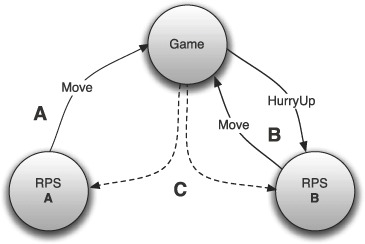
After the game has been initialized and players are in position to make their moves, one eventually will make the first move, as indicated at A. The Game actor then checks to see if the other player has made their move, and if not, sends them a hastening message, after which the second user will also make their move (B). Finally, C illustrates the point at which the game adjudicates the match and notifies both parties of the winner. Each instance then displays a witty message appropriate to the user’s winning or losing status.