concept color in category scratch
appears as: color, colors, color, colors

This is an excerpt from Manning's book Hello Scratch!: Learn to program by making arcade games.
Click the Touching Color block. The word color will be on the block, but you should also see a square filled with a color. In figure 1.21, the square is green.
Drawing is about angles and ratios and fractions. It’s about creative problem solving and figuring out how to take an idea from your mind and get it onto the screen. Thinking like an artist means understanding which colors go together, how to break down objects into smaller parts, and how to create depth with shading. These are all things you’ll learn with this book.
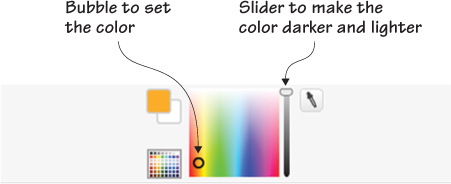
Move the black bubble (seen in figure 2.6) around the rainbow until you find the color you want. Check the current color by looking at the top square to the left of the rainbow box. You don’t need to click anything to set the color. Instead, leave the bubble over the color you want. Use the slider on the right side of the rainbow box to make the shade of the color darker or lighter. Figure 2.6. Choose a color from the rainbow box by moving around the black bubble. You can see the current color choice in the little square outside the top left corner of the rainbow box.
You can use either method to choose a color for your cat.