concept line in category scratch

This is an excerpt from Manning's book Hello Scratch!: Learn to program by making arcade games.
Don't worry if math isn't your strong suit or if you've never written a line of code in your life. This book will give you all the tools you need to get started.
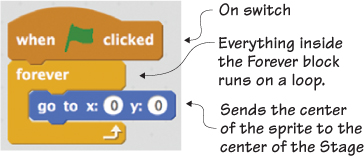
isn’t X:0 and Y:0 the center of the Stage? Why use those numbers if you want the line to be at the bottom of the screen?
remember that every sprite comes with a transparent background. The barrier line sprite may look like a tiny two-dimensional line, but the sprite is the size of the whole Stage (or Art Editor). To imagine this with real objects, cut out a tiny strip of black paper and put it at the bottom of a square piece of plastic wrap. That’s how Scratch processes your sprite. Because you drew the line at the bottom of the Art Editor, exactly where you wanted it to be for the game, you can use that as the transparent center of the sprite, which matches the center of the Stage.
The script in figure 7.31 sends the line to the bottom of the Stage because the line was drawn at the bottom of the Art Editor. It is matching the center of the sprite with the center of the Stage, and therefore the line is positioned exactly where it is drawn.