concept Seam in category seam

This is an excerpt from Manning's book Seam in Action.
Seam revitalizes the standard Java EE platform by putting an end to its divergence and unifying its components, filling in the voids for which it is often criticized, making it more accessible, extending its reach to third-party frameworks and libraries, and form-fitting them all together as a well-integrated and consistent stack. While the features of Seam are vast, Seam’s core mission is getting JSF, JPA, and POJO components to work together so that the developer’s focus can be placed on building the application, not on integrating unallied technologies.
These filters each offer specific features that contribute to enhancing the narrowly scoped JSF life cycle. For instance, the ExceptionFilter allows Seam to capture all exceptions that are thrown during request processing, something that servlets alone cannot encompass. I cover exception handling in Seam near the end of this chapter. As fine-grained as the JSF life cycle is, its scope is limited to the JSF servlet alone. The ContextFilter opens access to the Seam container and its context variables to non-JSF servlets, such as Struts, Spring MVC, and Direct Web Remoting (DWR). Although a majority of Seam’s work is done in the JSF servlet, these additional filters allow Seam to extend the boundaries of its life cycle above and beyond the reach of the JSF servlet.
That covers the configurations necessary to hook Seam into the servlet life cycle. But wait a minute; aren’t we missing the JSF phase listener configuration? After all, that’s how Seam is able to tap into the JSF life cycle.
If the Seam debug JAR file, jboss-seam-debug.jar, is included on the classpath, and Seam is running in debug mode, Seam registers an additional JSF phase listener, SeamDebugPhaseListener. The sole purpose of this phase listener is to trap requests for the servlet path /debug.seam (assuming the JSF servlet extension mapping .seam) and render a developer debug page. This debug page introspects various Seam contexts (conversation, session, application, business process) and lets you browse the objects stored in them. Information about the long-running conversations in the current session is displayed and conversations can be selected to reveal the objects stored in them. The debug page is also used to display the exception summary when the application faults.
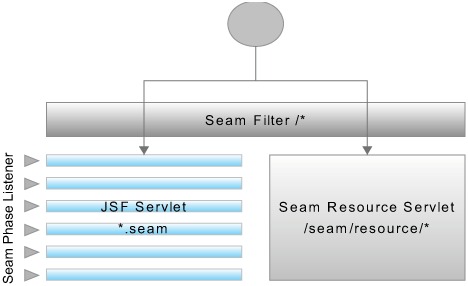
That wraps up the configuration necessary to allow Seam to partake in requests. From here on, I’ll refer to the combination of the Seam servlet filter and the JSF life cycle, which Seam now has a hand in, as the Seam life cycle. Figure 3.2 illustrates the two paths that a request can take as it enters the Seam life cycle. The SeamFilter can also wrap additional servlets such as Struts, Spring MVC, or DWR, allowing you to tap into the Seam container from these third-party frameworks as needed.
Figure 3.2. Requests are preprocessed by the Seam filter, proceeding to the JSF servlet or the Seam resource servlet.
With the configuration of Seam out of the way, let’s take a step back and consider what the JSF life cycle is like without Seam. The goal of this exercise is to gain an appreciation for the assumptions made by the JSF specification and where those assumptions come up short. Contrasting the native JSF life cycle with the version enhanced by Seam helps you understand why Seam is relevant and clarifies when you should choose the Seam facilities over the JSF equivalents that they replace. I’ll start by reviewing the general principles of JSF and then walk you through the JSF life cycle.
For us to use Seam in an application server environment, it must be hooked into the life cycle of the servlet container. When the application starts, the servlet container bootstraps Seam, at which time Seam loads its contextual container, scans for components, and begins serving out component instances. Once running, the servlet container also notifies Seam when HTTP sessions are opened and closed. Seam also enrolls itself in servlet requests by registering a servlet filter, a servlet, and a JSF phase listener. It is through these servlet and JSF phase events that Seam manages its container and enhances the default JSF life cycle.
Listing 11.1. An authentication component that plugs into Seam’s JAAS login module
package org.open18.action; import org.jboss.seam.security.Identity; import ...; @Name("authenticationManager") public class AuthenticationManager { @In private EntityManager entityManager; @In private Identity identity; @In private PasswordManager passwordManager; @Out(required = false) Golfer currentGolfer; @Transactional public boolean authenticate() { try { Member member = (Member) entityManager.createQuery( "select m from Member m where m.username = :username") .setParameter("username", identity.getUsername()) .getSingleResult(); if (!validatePassword(identity.getPassword(), member)) { return false; } identity.addRole("member"); if (member.getRoles() != null) { for (Role role : member.getRoles()) { identity.addRole(role.getName()); } } if (member instanceof Golfer) { currentGolfer = (Golfer) member; identity.addRole("golfer"); } return true; } catch (NoResultException e) { return false; } } public boolean validatePassword(String password, Member m) { return passwordManager.hash(password).equals(m.getPasswordHash()); } }