concept search engine in category search

This is an excerpt from Manning's book AI-Powered Search.
Within the software engineering world, a search engine is one of the most cross-functional kinds of systems in existence. Most underlying search engine technology is designed to operate in a massively scalable way - scaling to millions, billions, or in a select cases trillions of documents, handling enormous volumes of concurrent queries, and delivering search results in hundreds of milliseconds or often less. In many cases, real-time data ingestion and near-real-searching on newly ingested data is also required, and all of this must be massively parallelizable across numerous servers in order to scale out to meet such high performance requirements.
Figure 2.1. Unstructured Data. This text represents typical unstructured data you may find in a search engine.

Free text content is considered the primary type of unstructured data, but search engines are also commonly used to index many other kinds of data that similarly don’t fit neatly into a structured database. Common examples include images, audio, video, and event logs. Figure 2.2 expands on our text example from Figure 2.1 and includes several other types of unstructured data, such as audio, images, audio, and video.
Listing 4.2. Send product documents to the search engine
#Create Products Collection
products_collection="products"
create_collection(products_collection)

#Modify Schema to make some fields explicitly searchable by keyword
upsert_text_field(products_collection, "upc")
upsert_text_field(products_collection, "name")
upsert_text_field(products_collection, "longDescription")
upsert_text_field(products_collection, "manufacturer")

print("Loading Products...")
csvFile = "../data/retrotech/products.csv"
product_update_opts={"zkhost": "aips-zk", "collection": products_collection, "gen_uniq_key": "true", "commit_within": "5000"}
csvDF = spark.read.format("com.databricks.spark.csv").option("header", "true").option("inferSchema", "true").load(csvFile)
csvDF.write.format("solr").options(**product_update_opts).mode("overwrite").save()
print("Products Schema: ")
csvDF.printSchema()
print("Status: Success")

This is an excerpt from Manning's book Deep Learning for Search.
With the help of DL algorithms, a search engine is able to
Because the final units to be created by the text analysis algorithm might be words but also might be group of words or sentences, or even portions of words, we refer to these fragments as terms. You can think of a term as the fundamental unit that a search engine uses to store data and, consequently, retrieve it.
That’s the basis of one of the most fundamental forms of search, keyword search: a user types a set of words and expects the search engine to return all the documents that contain some or all of the terms. This is how web search started decades ago. Although many search engines today are much smarter, many users keep composing queries based on the keywords they expect the search results to contain. This is what you’ll learn now: how the text entered by a user into a search box makes the search engine return results. A query is what we call the text the user enters in order to search for something. Although a query is just text, it conveys and encodes what the user needs and how the user expresses this possibly general or abstract need (for example, “I want to learn about the latest and greatest research in the field of artificial intelligence”) in a way that’s concise but still descriptive (for example, “latest research in ai,” as in figure 1.3).
If, as a user, you want to find documents that contain the word “search,” how would the search engine return such documents? A not-so-smart way of doing that could be to go over each document’s content from the beginning and scan it until the search engine finds a match. But it would be very expensive to perform such text scans for each query, especially with many large documents:
Now let’s try to understand how much of what the search engine is doing users can see. A crucial issue in creating effective search queries is which query language you use. Some years ago, you would enter one or more keywords in a search box to perform a query. Today, technology has evolved to the point that you can type queries in natural language. Some search engines index documents in multiple languages (for example, for web search) and allow subsequent querying. If you search for the same thing but express it with slightly different queries in a search engine like Google, you’ll observe surprisingly different results.
Listing 2.2. Adding documents to the Lucene index
IndexWriterConfig config = new IndexWriterConfig(analyzer);             #1
IndexWriter writer = new IndexWriter(directory,
   config);                                                             #2

Document dl4s = new Document();                                         #3
dl4s.add(new TextField("title", "DL for search",
   Field.Store.YES));                                                   #4
dl4s.add(new TextField("page", "Living in the information age ...",
   Field.Store.YES));

Document rs = new Document();
rs.add(new TextField("title", "Relevant search", Field.Store.YES));
rs.add(new TextField("page", "Getting a search engine to behave ...",
   Field.Store.YES));

writer.addDocument(dl4s);                                               #5
writer.addDocument(rs);

This is an excerpt from Manning's book Relevant Search: With applications for Solr and Elasticsearch.
Getting a search engine to behave can be maddening. Whether you’re just getting started with Solr or Elasticsearch, or you have years of experience, you’ve likely struggled with low-quality search results. Out-of-the-box settings haven’t met your needs, and you’ve fought to deliver even marginally relevant search results.
When it comes to relevance ranking, a search engine can seem like a mystical black box. It’s tempting to ignore relevance problems—turning the focus away from search and toward other, less mystical parts of the application such as performance or the UI. Unfortunately, the work of search relevance ranking can’t be avoided. Users increasingly need to work with large amounts of content in today’s applications. Whether this means products, books, log messages, emails, vacation rentals, or medical articles—the search box is the first place your users go to explore and find answers. Without intuitive search to answer questions in human terms, they’ll be hopelessly lost. Thus, despite the maddening, seemingly mystical nature of search, you have to find solutions.
Relevant Search demystifies relevance. What exactly is relevance? It’s at the root of the search engine’s value proposition. Relevance is the art of ranking content for a search based on how much that content satisfies the needs of the user and the business. The devil is completely in the details. Ranking search results for what content? (Tweets? Products? Beanie Babies?) For what sorts of users? (Doctors? Tech-savvy shoppers?) For what types of searches? (Written in Japanese? Full of grocery brands? Filled with legal jargon?) What do those users expect? (A shopping experience? A library card catalog?) And what does your employer hope to get out of this interaction? (Money? Page views? Goodwill?) Search has become such a ubiquitous part of our applications, creeping in inch by inch without much fanfare. Answering these questions (getting relevance right) means the difference between an engaging user experience and one that disappoints.
Search is a conversation between a user and a search engine. The user attempts to satisfy an information need by providing search with appropriate constraints describing relevant content. The search engine uses those constraints to collect matches, providing them to the user. If the user is satisfied with a match, that user will inspect individual items in further detail. Otherwise, the user will refine the search criteria and try again. Your work is to facilitate this conversation. You must ensure that search results are relevant and you must help users understand why results match, enabling them to refine their searches.
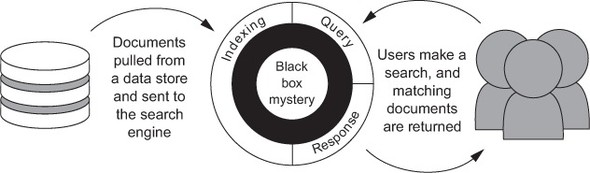
But creating relevant search requires more than you may initially anticipate. New search developers see search as a black box with just a few modes of interaction: you add content and allow users to query that content. In this chapter, we reveal the secrets under this dark mantel. And spoiler alert, there’s no magic involved in search. Under the hood, a search engine’s data structures perform rather dumb term-matching. Results are then ranked using simple heuristics. The search engine is mechanical: it has no understanding of the meaning of the terms, the intentions underlying a user’s search, or the context of the application.
Your initial understanding of the search engine may be simple. With some basics under your belt, you might have roughly the mental model shown in figure 2.1. Content makes its way into the search engine, and users query and explore by interacting with a search application.
Before getting under the hood, into the arcane black box, let’s quickly review the search engine’s capabilities from an outsider’s point of view. As you know, the central functions of a search engine are storing, finding, and retrieving content. Although these are all basic concepts, it’s useful to review them in order to establish a shared set of definitions and fill in any technical gaps you may have.
The preceding section discusses how search enables content exploration, but how do you provide the search engine with the content to be searched? Data is first extracted from a location where content is stored. This might be a database, text files, web pages, or other source. This raw data is converted into the search fields and documents described previously. These documents may be further enriched by adding in new fields with external information helpful for matching or ranking.
After being handed to the search engine, the fields of a document undergo a process called analysis, shown in figure 2.3.