concept vector in category search

This is an excerpt from Manning's book AI-Powered Search.
In recent years, the distributional hypothesis has been applied to create semantic understandings of terms and term sequences through what are known as word embeddings. A word embedding is a numerical vector that is intended to represent the semantic meaning of a given term sequence (typically a word or phrase). The term sequence is encoded into a reduced-dimension vector which can be compared with the vectors for all of the other word embeddings within the corpus, in order to find the most semantically-related documents.
In order to understand this process, it may be useful to think of how a search engine works out of the box. Let’s imagine a vector exists for each term that contains a value (dimension) for every word in your corpus. It might look something like Figure 2.10.
Figure 2.10. Vectors with one dimension per term in the inverted index. Every query on the left maps to a vector on the right, with a value of "1" for any term in the index that is also in the query, and a "0" for any term in the index that is not in the query.
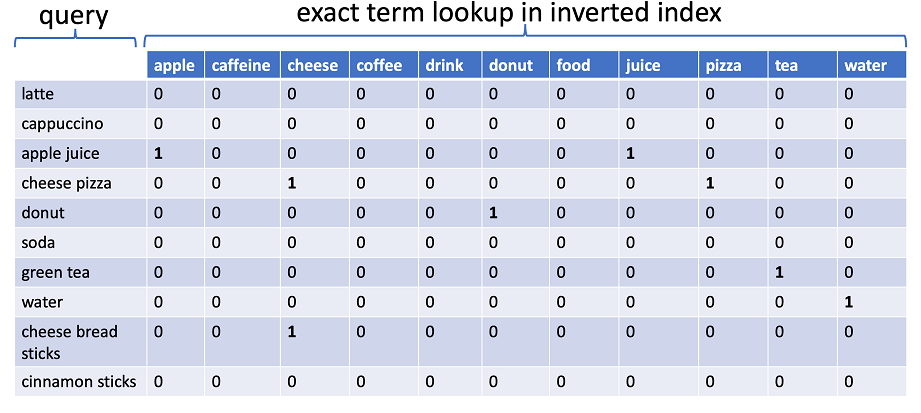
Figure 2.10 demonstrates how document matching and similarity scoring typically works in most search engines by default. For every query, a vector exists which contains a dimension for every term that is in the inverted index. If that term exists in the query, the value in the vector is "1" for that dimension, and if that value does not exist in the query, then the value is "0" for that dimension. A similar vector exists for every document in the inverted index, with a "1" value for any term from the index that appears in the document, and a zero for all other terms.
When a query is executed, an exact lookup occurs in the index for any matched terms (post-text-analysis), and then a similarity score is calculated based on a comparison of the vector for the query and the vector for the document that is being scored relative to the query. We’ll talk through the specific scoring calculation further in chapter 3, but that high-level understanding is sufficient for now.
If we mapped both of these documents (containing a combined 48 words) to vectors, they would map to a 48-word vector-space with the following dimensions:
[a, and, apple, apples, avocado, award, best, brian, cheese, chicken, chips, chocolate,
 concentrate, cookie, cup, farms, for, freshest, from, fruit, grilled, ham, has, ice, in, is, its,
 juice, lemonade, lynn, made, mohammed, never, orchard, organic, plain, potato, premium, received,
 regional, row, salad, sandwich, the, three, turkey, water, years]
If you recall in section 2.3, we proposed thinking of a query for the phrase
apple juiceas a vector containing a feature for every word in any of our documents, with a value of1for the termsappleandjuice, and a value of0all other terms.
Figure 3.1. Query Vector. The query for
apple juiceis mapped to a vector containing one dimension for every known term, with a value of1for the termsappleandjuiceand a value of0for all other terms.
Note that even though the query vector only contains a non-zero value for two dimensions (representing the position of
appleandjuice), that it still contains values of0for all other possible dimensions. Representing a vector like this including every possible value is known as a dense vector representation.
Notice that
doc1anddoc2still yield the same relative score, but that now the actual score is1.0. If you remember, a1.0score from a cosine calculation means the vectors are perfect matches, and in fact, it should be obvious that since each of the sparse vectors contain the exact same values ([1 1]) that they are all equal and thus get a perfect score.

This is an excerpt from Manning's book Deep Learning for Search.
Probably one of the most commonly used information retrieval models is the vector space model (VSM).[5] In this model, each document and query is represented as a vector. You can think of a vector as an arrow in a coordinate plane; each arrow in VSM can represent a query or a document. The closer two arrows are, the more similar they are (see figure 1.8); each arrow’s direction is defined by the terms that compose the query/document.
public static INDArray toDenseAverageVector(Terms docTerms, double n,
    Word2Vec word2Vec, WordEmbeddingsSimilarity.Smoothing smoothing)
        throws IOException {
  INDArray vector = Nd4j.zeros(word2Vec.getLayerSize());
  if (docTerms != null) {
    TermsEnum docTermsEnum = docTerms.iterator();
    BytesRef term;
    while ((term = docTermsEnum.next()) != null) {
      INDArray wordVector = word2Vec.getLookupTable().vector(
        term.utf8ToString());
      if (wordVector != null) {
        double smooth;
        switch (smoothing) {
          case MEAN:
            smooth = docTerms.size();
            break;
          case TF:
            smooth = docTermsEnum.totalTermFreq();
            break;
          case IDF:
            smooth = docTermsEnum.docFreq();
            break;
          case TF_IDF:
            smooth = VectorizeUtils.tfIdf(n, docTermsEnum.totalTermFreq(),
                docTermsEnum.docFreq());
            break;
          default:
            smooth = VectorizeUtils.tfIdf(n, docTermsEnum.totalTermFreq(),
                docTermsEnum.docFreq());
        }
        vector.addi(wordVector.div(smooth));
      }
    }
  }
  return vector;
}
Let’s start building a retrieval system based on vectors generated by word2vec. The goal is to rank documents against queries, but word2vec gives vectors for words, not sequences of words. So the first thing to do is find a way to use these word vectors to represent documents and queries. A query will usually be composed of more than one word, as will indexed documents. For example, let’s take the word vectors for each of the terms in the query “bernhard riemann influence” and plot them as shown in figure 5.3.
A simple method to create document vectors from word vectors is to average the word vectors into a single document vector. This is a straightforward mathematical operation: every element at position j in each vector is added, and the total is then divided by the number of vectors being averaged (the same as an arithmetic averaging operation). You can do that with DL4J vectors (INDArrays objects) as follows:
Note that this technique can be applied to both documents and queries, because they’re compositions of words. For each document-query pair, you can calculate the document vectors by averaging the word vectors and then assign the score to each document based on how close their respective averaged word vectors are. This is similar to what you do in the VSM scenario; the big difference is that the values of these document vectors aren’t calculated using TF-IDF but come from averaging word2vec vectors. In summary, these dense vectors are less heavy in terms of required memory (and space, if stored to disk) and more informative in terms of semantics.