concept port in category security

This is an excerpt from Manning's book The Art of Network Penetration Testing.
Now if you change into the discovery/hosts directory where you told nmap to write the pingsweep output you should see three files; pingsweep.nmap, pingsweep.gnmap, and pingsweep.xml. Go ahead and cat out each of these three files just to familiarize yourself with what they look like. The XML output file will come in handy once you begin scanning individual targets for listening ports and services. For the sake of this chapter you need to pay attention to only the pingsweep.gnmap file. This is the “greppable nmap” file format that conveniently places all of the useful information on a single line so you can quickly use grep to find what you are looking for. You can grep for the string “Up” to get the IP address of all the hosts that responded to your ICMP echo discovery probe.
Once again, nmap is the tool of choice for discovering network services. As with the ICMP ping sweep example, the idea here is to iterate through each IP address in your targets.txt file. Only this time, rather than check if the host is up and replying to ICMP request messages, nmap is going to see if the host will attempt to establish a TCP connection with our attacking machine on port zero, and then on port one, and then on port two, all the way up to 65,535.
You might be thinking to yourself, does nmap need to “speak” each individual network protocol of a given service if it does find one listening on a given port? Bonus points to you if you were thinking that by the way. The answer is, not necessarily. If you are only checking to see if a port is open there is no need to be able to have meaningful communication with the service listening on that port. Let me explain that further.
Listing 3.4 nmap scanning all ports with service probes and script scanning
nmap scan report for 10.0.10.160
Host is up (0.00012s latency).
Not shown: 65534 closed ports
PORT   STATE SERVICE VERSION
22/tcp open  ssh     OpenSSH 7.6p1 Ubuntu 4ubuntu0.3 (Ubuntu Linux;    #A protocol 2.0)
| ssh-hostkey:    #B
|   2048 9b:54:3e:32:3f:ba:a2:dc:cd:64:61:3b:d3:84:ed:a6 (RSA)
|   256 2d:c0:2e:02:67:7b:b0:1c:55:72:df:8c:38:b4:d0:bd (ECDSA)
|_  256 10:80:0d:19:3f:ba:98:67:f0:03:40:82:43:82:bb:3c (ED25519)
Service Info: OS: Linux; CPE: cpe:/o:linux:linux_kernel

Post-scan script results:
| clock-skew:
|   -1h00m48s:
|     10.0.10.200
|     10.0.10.202
|     10.0.10.207
|_    10.0.10.205
Service detection performed. Please report any incorrect results at https://nmap.org/submit/ .
nmap done: 22 IP addresses (22 hosts up) scanned in 1139.86 seconds
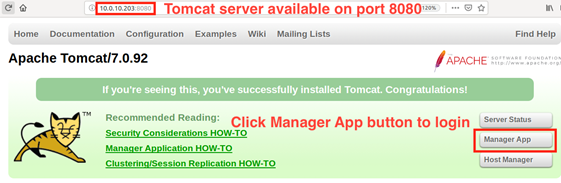
Figure 5.2 An Apache Tomcat server listening on port 8080