concept Sencha Touch in category sencha touch

This is an excerpt from Manning's book Sencha Touch in Action.
In this chapter you’ll begin your journey into the world of Sencha Touch, where you’ll learn what Sencha Touch is and the problems it aims to solve, such as enabling development of cross-platform user interfaces with HTML5. Then we’ll look at the widgets that the framework provides. Lastly we’ll discuss some of the ways you should think about developing your mobile application to avoid future performance issues.
The Form panel is a container that’s typically used to display any of the input fields that Sencha Touch provides and is automatically scrollable. Your fields can be grouped via the FieldSet widget. Figure 1.6 shows an example of a Form panel requiring user input.
Figure 1.6. Form panels are used to display input fields and contain necessary controls to manage the submission of data to your server.
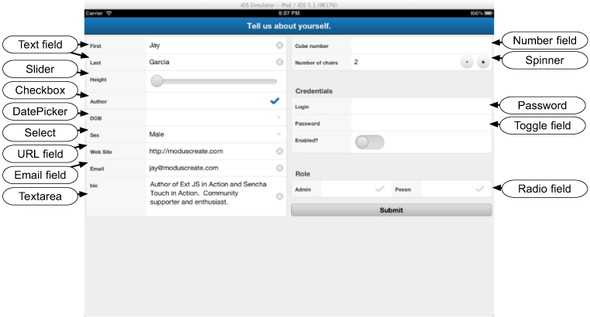
In figure 1.6 we have most of the input fields that Sencha Touch offers, with the exception of the Hidden field. With Sencha Touch the Text, Checkbox, URL, Email, Textarea, Number, Password, and Radio fields all implement native HTML5 input elements, with the addition of styling. Each of these, except for the Radio and Checkbox fields, will force the native slide-in keyboard to appear when focused, allowing users to enter data into the fields.
The Checkbox and Radio fields work similarly to their native web counterparts, except that they’re stylized via Sencha Touch’s own check icon to mimic native application behavior. In this example the Role checkboxes, grouped in a Fieldset, are Radio fields, allowing only one selection in the set.
Sencha Touch solves cross-platform mobile app development problems by giving developers the tools necessary to build cross-platform applications that mimic natively compiled applications, while making full use of HTML5 and CSS3. It also allows developers who have years of experience on the web to develop cross-platform mobile apps that can exist solely on the web, or be deployed in an app store with either the Sencha native packager or tools like PhoneGap.
As of this writing, Sencha Touch runs on mobile WebKit-based browsers in iOS (iPhone, iPad) devices as well as on Android phones and tablets.