concept approval in category sharePoint

This is an excerpt from Manning's book SharePoint 2010 Workflows in Action.
Take, for instance, a business process that manages expense reports. Most companies need a defined business process to manage the submission and approval of employees’ monthly expenses. The flow of work in figure 1.1 shows an employee tracking his expenses and then submitting them electronically to a manager.
SharePoint Foundation includes only one out-of-the-box workflow, and that is the Three-state workflow. With SharePoint Server, you also get the Approval, Collect Signatures, Collect Feedback, Disposition Approval, and Translation workflows. Please check out chapter 3 for more information on these out-of-the-box workflows.
Another difference is that, with the Three-state, workflow you can define the states however you wish. With the Approval workflow, the states are not configurable. The Approval workflow is a trimmed down version of the Three-state workflow, used only for the approval of documents or items.
You may be thinking, “Why not use the readily available out-of-the-box content approval features?” The nice thing with the Approval workflow is that it creates tasks assigned to people to manage the approval, whereas, with content approval, you update the document or list item directly. With content approval, the document may be waiting to be approved but no one is notified that it’s waiting. With the Approval workflow, the approver gets the notification via email.
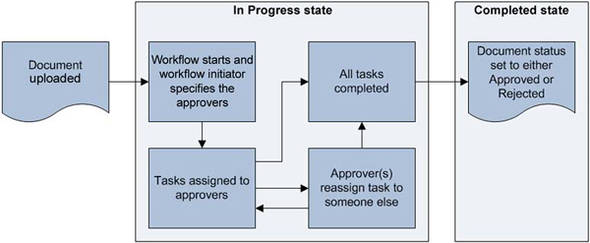
Another important thing that the Approval workflow brings to the table is the use of Assignment stages. Assignment stages are discussed in greater detail in chapter 4. They give your users the ability to specify more than one individual that needs to approve the document. You can also specify the order in which the approvals will take place or if the approvals can happen in parallel. Assignment stages also let the person starting the workflow specify all the approvers and settings at runtime. This is convenient because you don’t have to know who the approvers are ahead of time like you would in the Three-state workflow.
Finally, the Approval workflow has the advantage of allowing the tasks assigned to the approvers to be reassigned. This may happen if the designated approver doesn’t feel qualified to make the approval. They can then reassign the task of approving the document to someone else, in which case the workflow will no longer be waiting for the original individual but rather for the one to whom the document was reassigned.