concept attachment in category sharePoint
appears as: ttachments, n attachment
This is an excerpt from Manning's book SharePoint 2010 Site Owner's Manual: Flexible Collaboration without Programming.
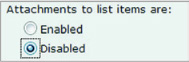
By default when you create a Contacts list, a paper clip icon will display attachments associated with an item. For our scenario there’s no need for a user to upload an attachment because all the information needed can be captured in the columns, so you’re going to disable the feature.
Action
Result/Notes
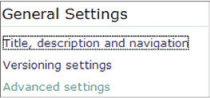
1 Choose List Settings under the List tab located in the Ribbon. 2 Select Advanced Settings under General Settings. 3 Click the radio button to disable attachments to list items. 4 Click OK. Your users will no longer have the ability to add an attachment. Now we’ll discuss how to customize the rest of the columns in the list.