concept connection interface in category sharePoint

This is an excerpt from Manning's book SharePoint 2010 Web Parts in Action.
The final modification is to edit the OnPreRender so that it registers the Control object provided from the connection interface as an asynchronous postback control. You accomplish this by using the ScriptManager object in the OnPreRender method:
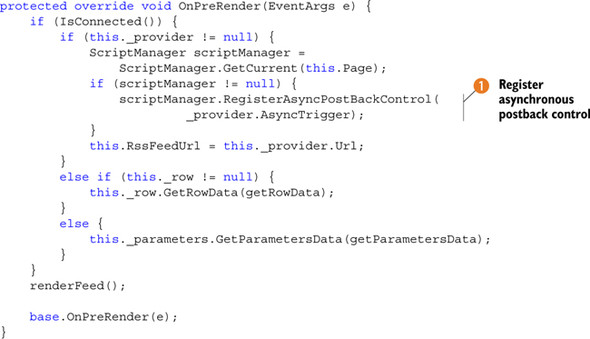
If the consumer Web Part is connected using the IUrlConnection interface, the current ScriptManager is retrieved. If the ScriptManager is found, it’s used to register
the control (AsyncTrigger) from the connection interface as an asynchronous post-back control. This operation converts the functionality of the button into an asynchronous operation.
If you deploy the solution now, connect the Web Parts using the custom connection interface, enter a URL to a feed, and click the Submit button, you’ll see that the consumer Web Part updates without refreshing the whole page. This simple change to the Web Parts and the connection interface is a small but efficient way to make the user interface of connected Web Parts and SharePoint faster.
. Define a connection interface, which is the connection contract
The consumer Web Part needs a consumer connection endpoint, and you implement that in a similar way. First add a new method that takes the connection interface as a parameter and mark it with the ConnectionConsumer attribute. The code should look like this:
IUrlConnection _provider;

[ConnectionConsumer("Feed Url", "feed")]
public void GetFeedConnection(IUrlConnection provider) {
    _provider = provider;
}

internal bool IsConnected() {
    return _provider != null;
}
First, a local property called _provider is defined and used to store a reference to the connection interface. The instance of that connection interface is set in the GetFeed-Connection method, which is the connection consumer endpoint. The attribute has two parameters; the first one is the display name for the connection and the second one an ID for the connection. The ID is optional at this point, but it’s required if the Web Part will have more than one connection consumer endpoint (and you’ll soon add more). Finally, you add an internal method that checks whether the Web Part is connected. This method will be used to ensure that the Web Part doesn’t use the connection if it’s not set.
If you deployed this project now, the provider and consumer can be connected, but because you haven’t as yet added any code in the RSS Web Part that uses the connection, you won’t see any results of the connection. To use the connection interface, you have to consider the order of events in a Web Part (see chapter 4). Figure 14.7 shows a part of the event flow of the Web Part when connections are involved.