concept createchildcontrol in category sharePoint
This is an excerpt from Manning's book SharePoint 2010 Web Parts in Action.
The Web Part is defined in the HelloWorldWebPart.cs file. The class derives from the ASP.NET Web Part class, which exists in the System.Web.UI.WebControls.WebParts namespace and System.Web assembly. To add the Label control, you override the CreateChildControls method, and in the overridden method, a new Label control is created and added to the control tree. The Text property of the Label control gets the value of "Hello World". Using Visual Studio 2010, you press F5 to build and deploy the Web Part into SharePoint 2010. The Web Part will be added to the Web Part Gallery during the deployment, and all you have to do is edit a page, locate the Web Part in the gallery, and add it to the page. This F5 deployment will be shown in greater detail in chapter 3.
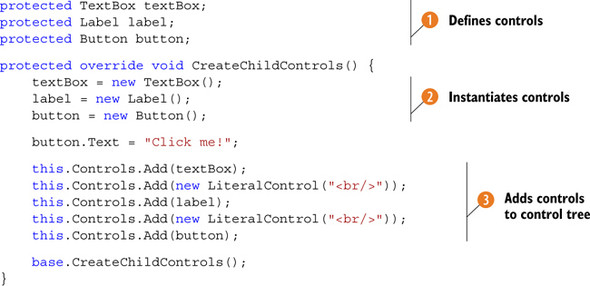
The user interface of the Editor Part is built by creating the input fields in the CreateChildControls method, as shown in listing 5.5.
Listing 5.5. Creation of the controls in the Editor Part
protected TextBox m_feedUrl; protected TextBox m_itemCount; protected override void CreateChildControls() { m_feedUrl = new TextBox(){ID = "feedUrl"}; m_itemCount = new TextBox() {ID = "itemCount"}; this.Controls.Add( new Label() { Text = "Feed Url:<br/>", AssociatedControlID = m_feedUrl.ID }); this.Controls.Add(m_feedUrl); this.Controls.Add( new Label() { Text = "<br/>Items to show:<br/>", AssociatedControlID = m_itemCount.ID }); this.Controls.Add(m_itemCount); this.Title = "Feed Properties"; base.CreateChildControls(); this.ChildControlsCreated = true; }The input fields are defined as protected and created in CreateChildControls. The controls are then added to the child controls collection. The Title property is set to the title of the Editor Part; this is especially important if you have several Editor Parts. Notice how the Label controls are added and associated with the input form controls.
At this point, you haven’t added a body to the Web Part so that it displays the configured feed, so let’s do that next. The content of the Web Part is generated in the CreateChildControls method, in which you add the code shown in listing 5.2. This code requires you to add a using statement to the System.Linq and System.Xml. Linq namespaces.