concept Data Form Web Part in category sharePoint
This is an excerpt from Manning's book SharePoint 2007: Developer’s Guide to Business Data Catalog.
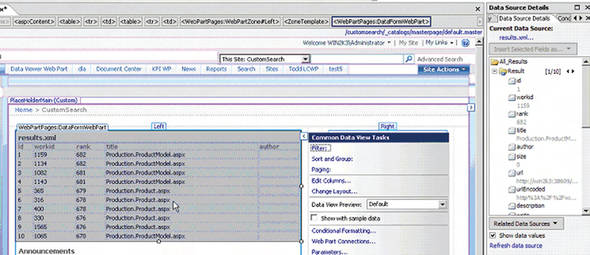
If you’ve used Microsoft FrontPage 2003 with SharePoint 2003, or Microsoft Office SharePoint Designer 2007 with Microsoft SharePoint 2007, you’ll probably be familiar with the Data View Web Part (now known as the Data Form Web Part). Using a wizard, and being armed with the correct database information and credentials, you could display data within minutes to your users. With a little help from Microsoft SharePoint Designer, you can manipulate the data in the grid; modify the display; use conditional formatting, formulas, and functions; and choose from several predefined styles. You could also connect multiple Data Form Web Parts to display master/detail information, or connect the data to other web parts such as third-party charting web parts.
With the Business Data Catalog, you can achieve the same results as with the Data Form Web Part, with or without the use of Microsoft SharePoint Designer. One of the many advantages of both BDC and the Data Form Web Part is the fact that you can connect web parts together. You can also create your own custom web part to display line-of-business (LOB) data.
Microsoft Office SharePoint Server 2007 Enterprise Edition (MOSS) ships with numerous Business Data Web Parts that enable us to display business data in various formats, and provide an interface to the entity actions. In chapter 2 of this book, we learned how to configure entities, associations, actions, and filters. This is where all of that stuff comes into play! The most commonly used web part from the Business Data Catalog Web Parts is the Business Data List, which displays business data in a data grid format. Others include web parts that display data in a columnar format (one row at a time). Also included are web parts specific to Profile pages, which we’ll be discussing in this chapter. One of the most versatile web parts is the Data Form Web Part that ships with Microsoft Office SharePoint Designer. We’ll use this web part to connect to our business data, as it allows for more customization than the Business Data List Web Part. In this chapter, we’ll explore all of the Business Data Catalog Web Parts that come with MOSS Enterprise, and we’ll explore the Data Form Web Part in SharePoint Designer. First, let’s explore the purpose of the out-of-the-box web parts.