concept log in category sharePoint

This is an excerpt from Manning's book SharePoint 2010 Web Parts in Action.
SharePoint 2010 contains numerous features to enable you to troubleshoot your applications while developing or running in production. All requests to SharePoint are given a unique id, which can be used to trace a specific error message to a request. This number is called the correlation id. Depending on how you’ve configured SharePoint errors, warnings and information messages are logged to the SharePoint-specific trace logs and databases, or to the Windows Event Log. All of these log entries contain a correlation id, which allows you to combine logs from different sources to get a bigger picture of a specific error or warning.
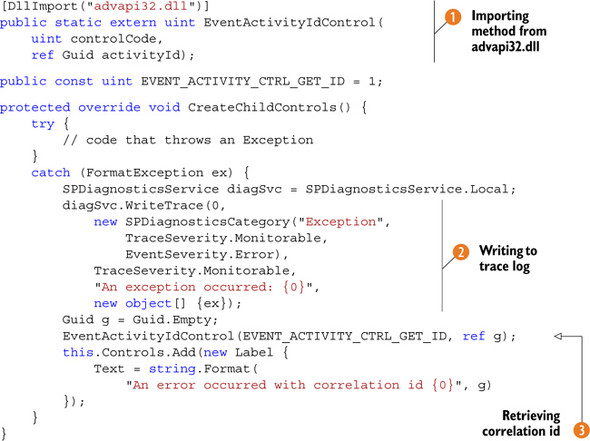
Both methods have nearly the same signature but write to different locations. Writing to the Windows event log may be desirable if there are some serious errors that must be escalated to systems monitoring the event logs. Normally the SharePoint trace logs are the best way to go. Listing 8.1 shows how to write to the trace log and write the current correlation id in the Web Part. This can be a good practice if you’d like your users to report the correlation id if any errors occur so that you can find the source of the error.
To get the current correlation id, the EventActivityIdControl method is imported
from the advapi32.dll file. This Web Part throws an exception in the code, which is caught. To write to the trace log, the local diagnostics service is retrieved, and using the WriteTrace method
, the exception is logged. The first parameter is a custom id of the log record. The second parameter describes the category of the record and includes a name and the default throttling levels for the trace and event logs. The severity level of the current record is also supplied, as well as the error message with its optional parameters. The correlation id is retrieved by invoking the imported EventActivityIdControl method
. The user is informed about the correlation id by adding a Label control to the Web Part.