concept security in category sharePoint

This is an excerpt from Manning's book SharePoint 2010 Web Parts in Action.
By default, these site pages can’t contain inline server-side code, such as custom logic and events. Assume that you create a new site page in a document library and want to add a submit button that runs some code when clicked. You can’t do this using inline code without changing the security settings of your SharePoint web application. You can lower the security, but I don’t recommend it because that exposes your web application to malicious code. Instead, you have two basic options that work equally well but have different purposes:
Sandboxed solutions in SharePoint make deployment easier and allow you to create custom applications in a controlled manner. Sandboxed solutions also introduce a new security scope for SharePoint applications with a limited security policy. Previous SharePoint versions had only one level where the application was fully trusted (deployed to the global assembly cache, or GAC) and one level in partial trust (deployed in the local web application bin folder, which required a lot of configuration). The level of security and type of deployment is determined by the needs and use of the application. This chapter discusses the various options using a set of examples.
This is an excerpt from Manning's book SharePoint 2010 Workflows in Action.
This out-of-the-box experience is a compelling reason to manage your business processes within SharePoint, because it provides a user interface and other workflow fundamentals like security, reporting, and logging. These features make SharePoint workflows and your business processes a powerful combination.
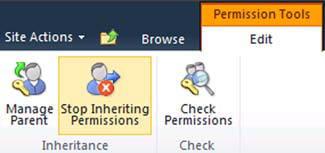
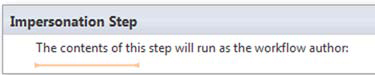
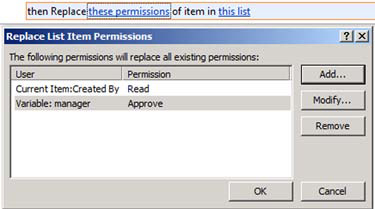
In addition to those two techniques, SPD 2010 has a host of new actions and conditions of particular interest. The two most exciting groups include actions and conditions that manage document sets and security permissions. Document sets are groups of documents. Workflows can run on top of these sets and do interesting things such as routing them for retention within the Records Center. This may be desirable for compliance or legal considerations. The second group includes actions and conditions concerning SharePoint security. With SPD 2010, your workflows can manage security by adding and removing user permissions on documents, for example.
Table 5.7. Working with security-related Actions and Conditions in an SPD workflow

This is an excerpt from Manning's book SharePoint 2007: Developer’s Guide to Business Data Catalog.
Once the application definition file has been authored, it’s uploaded to the Shared Services database via the Shared Services Provider page available from SharePoint Central Administration. The metadata is then stored there until it’s updated, either with another ADF, or via the object model. Figure 1.9 displays the Shared Services Provider page that’s used to upload the ADF, and also configure security trimming on the business data.
Every database or data source usually contains its own security model, its own authentication mechanisms, and its own permissions/role model. The Business Data Catalog provides authentication properties that allow you to take advantage of the back-end security model, providing multiple types of authentication and permission inheritance from the data source. But BDC also provides the ability to security trim on the front end as well as the back end. This is sometimes referred to as a pain in the neck, because it almost seems that you’re granting permissions twice to the data source—once in the back end and once in the front end. But it does mean that somebody who can access data via the company’s LOB system may not need or shouldn’t be granted permission to the same data via SharePoint. Therefore each LOB application, and each entity, can have further permissions set for SharePoint users from within SharePoint.
Security in the Business Data Catalog is something that can also be configured using the BDC API. Examples will be shown in the Business Data Catalog object model chapter of this book (chapter 8). In the next section, we’ll discuss the BDC Web Parts and how you can surface the data on your SharePoint sites. Upon adding a web part on the page, you’ll notice the errors that are displayed should you not have permission to execute the returned entity. One of the main advantages of the BDC is that you can add AD groups, authenticated users, and your SharePoint groups when configuring the BDC permissions. All of the permissions can also be set up in the application definition file. You’ll notice that, if you export an ADF from SharePoint, your configured permissions are included. This helps when moving your ADF from staging to production.