concept state machine workflow in category sharePoint
This is an excerpt from Manning's book SharePoint 2010 Workflows in Action.
When the workflow starts, the bug may be placed in a pending state, where it waits for a developer to be assigned to the bug and begin working on the bug. Thereafter, the developer starts working on the bug and fixes it, putting the bug into a fixed state. When a bug is fixed, a tester tries to confirm the resolution of the bug. If they find that it was not fixed, they place the bug back into a pending state. This ability to go back in time or to a previous state is only available with state machine workflows.
Some business processes will require a state machine and others won’t. It’s important to think through the requirements of your business processes before you begin building a custom workflow because it’s difficult to change a workflow from being a sequential workflow to a state machine workflow and vice versa. As you progress through this book, you’ll notice that some workflow tools can do only sequential workflows (as with SharePoint Designer), whereas other tools can do both types (as with Visual Studio). If you start building a workflow with a tool, and that tool doesn’t support state machines, you may find yourself starting over when you realize you need to change course. The bottom line is—understand the business requirements to determine which type of workflow is required before you start.
This requirement would be difficult to meet with a sequential workflow; a state machine workflow would be more appropriate. You could hack away to make it work in a sequential workflow using more while activities or adding a good deal of complex logic that tracks it all, but taking that path will create maintainability nightmares.
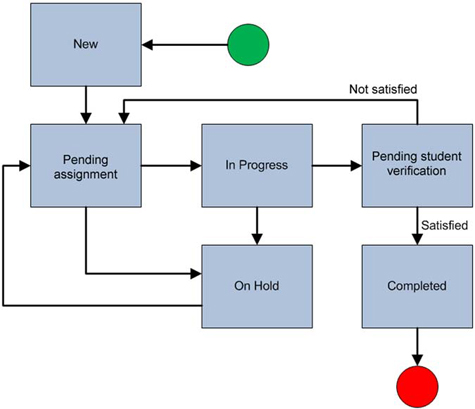
Figure 8.19 shows what the diagram would look like if you were to rewrite your sequential workflow into a state machine workflow. If you recall, the sequential workflow had only two states, In Progress and Completed, with much logic crammed into the In Progress state. Figure 8.19 shows six states rather than two. Notice how the workflow can more easily go back to a previous state. It’s not sequential at all. Also, if you remember from the previous example, when the work order was put on hold, the workflow terminated. A state machine workflow is allowed to reside in that state indefinitely or until the manager decides to put that work order back on the docket.
Figure 8.19. A better approach for the validation requirement would be to use a state machine workflow. It would be easy to add a new state for student verification, even a year after the workflow was first created.
State machine workflows require more clicking to configure despite their neater diagrams. You’ll find that state machine workflows require much less code because the logic is more modeled rather than coded.
Because the configuration of all the activities is nearly identical in both types of workflows, this section won’t rehash the same steps to configure the activities. Rather, you’ll take the high road and demonstrate how to set up and configure the states in a state machine workflow. If you’re curious about configuring a certain activity, go back to the previous section and see the full set of steps.