concept access in category silverlight

This is an excerpt from Manning's book Silverlight 4 in Action: Silverlight 4, MVVM, and WCF RIA Services.
The BufferingProgress property gives you access to the percentage of the completed buffering. Because this property value is always between 0.0 and 1.0, you need to multiply it by 100 to get the percentage. When this property changes by a value greater than 5 percent, the BufferingProgressChanged event will be fired. This event gives you the flexibility to keep your users informed through a progress bar or some other UI construct. As you can imagine, this type of component can be valuable when you’re streaming content.
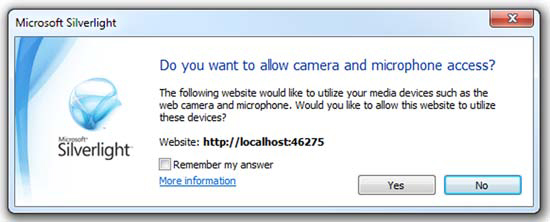
In sandboxed applications, the application must request access to the webcam from a user-initiated event, such as a button click. This is to ensure that a rogue application on a web site doesn’t start photographing you without your consent. The request is explicit as shown here:
if (CaptureDeviceConfiguration.AllowedDeviceAccess ||
    CaptureDeviceConfiguration.RequestDeviceAccess())
{ ... }
The first check is to see whether the application has already been granted access; this is true if it’s running under elevated trust or the user has already allowed access. The second check runs only if the first check is false; it causes the webcam and microphone device access confirmation dialog to be displayed, as shown in figure 20.9.
Once the user has confirmed access, you can begin to capture using a specific device or the default devices. Typically, you’ll use the default device.