concept LockableTextBox in category silverlight

This is an excerpt from Manning's book Silverlight 5 in Action.
The figure shows a control that provides functionality beyond a basic TextBox. This control adds an image that projects whether the TextBox can be edited. Although the desired functionality is easy to implement, you may not want to recreate it every time; this provides an excellent opportunity to create a reusable control. Now, imagine wanting to name this control LockableTextBox to use it in other projects. To do this, you must create an instance of the UserControl class.
Defining the appearance of a UserControl involves creating the XAML for the UI. This process is the same as defining the UI for a page in Silverlight because every page in Silverlight is a UserControl. The XAML for the UserControl (LockableTextBox) is shown in listing 12.12.
Listing 12.12. The UI for the LockableTextBox UserControl
<UserControl x:Class="MyClassLibrary.LockableTextBox" xmlns="http://schemas.microsoft.com/winfx/2006/xaml/presentation" xmlns:x="http://schemas.microsoft.com/winfx/2006/xaml" > <StackPanel x:Name="LayoutRoot" Orientation="Horizontal"> <TextBox x:Name="myTextBox" Height="24" Width="120" /> <Image x:Name="myImage" Height="24" Margin="5,0,0,0" Cursor="Hand" MouseLeftButtonUp="myImage_MouseLeftButtonUp" Source="http://www.silverlightinaction.com/unlocked.png" /> </StackPanel> </UserControl>The listing shows the XAML that makes up the default appearance of the LockableTextBox. This UI defines a TextBox and an Image within a StackPanel. The StackPanel is important because, as mentioned earlier, each UserControl can have only one UIElement as a child, so you’ll almost always use one of the Panel elements discussed in chapter 8 as the content of a UserControl.
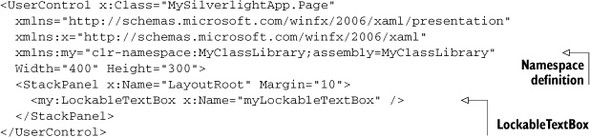
To include a UserControl in your application, you must do two things. First, you must add an XML namespace that references the location of the UserControl and you must add an instance of that control within your XAML. These two steps are the same for any UserControl. Listing 12.15 shows how to reference the LockableTextBox control built over the past two sections.
The example in the listing shows how to add the LockableTextBox to a basic Silver-light page. The my namespace is used to tell Silverlight where to look for the LockableTextBox definition. This definition is used to build the control, which is referenced later. That’s all there is to it.