concept loose resource in category silverlight

This is an excerpt from Manning's book Silverlight 4 in Action: Silverlight 4, MVVM, and WCF RIA Services.
In addition to using resources defined within your XAML, Silverlight enables you to access loose resources. A loose resource is an external entity, which may represent something such as an image hosted on some server on the Internet or some publicly visible JSON data. Regardless of the type of content, Silverlight provides the ability to access loose resources. To demonstrate accessing a loose resource, imagine an ASP.NET web application with the structure shown in figure 23.1.
Figure 23.1 shows the structure of a basic ASP.NET web application. This web application has one web page named Default.aspx. Assume that this web page hosts the Silverlight application defined within the MySilverlightApplication.xap file, which is nestled within the ClientBin directory. This will become important in a moment. Also note the four image files that are part of this web application structure: image01.png, image02.png, image03.png, and image04.png. These images represent the loose resources that we’ll use throughout this section.
You’ll learn two different ways to access loose resources. The first approach involves referencing loose resources whose location is relative to the Silverlight application. The second approach involves using an absolute Uri.
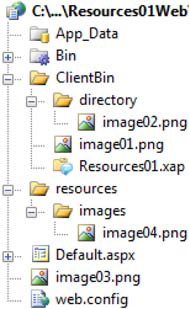
Silverlight allows you to access loose resources relative to the site of origin—the location where the requesting Silverlight application resides. In many cases, your Silverlight application will be stored within a subdirectory. For instance, in figure 23.1, the Silverlight application (MySilverlightApplication.xap) is stored within the ClientBin directory, so this directory can be considered the site of origin. If you want to access image01.png in figure 23.1, you could use the Source shown here:
<Image x:Name="myImage" Source="image01.png" />This accesses a resource in the same directory as MySilverlightApplication.xap. This directory represents the site of origin. If you change the Source property to reference /image01.png, you’d get the same result because the site of origin represents the root directory when a relative URI is used. This syntax will still allow you to reference loose resources in subdirectories. For instance, you could reference image02.png in figure 23.1 using the Source in this example:
<Image x:Name="myImage" Source="directory/image02.png" />This markup shows how to reference a loose resource in a subdirectory, demonstrating that you can use subdirectories with relative references. If you reference a .xap file on a remote server, all your references will be relative to that remote reference. This is important because you can’t use a relative URI to access loose resources in directories that are ancestors to the site of origin. This restriction is a security measure to help ensure that preexisting loose resources can’t be used unless you explicitly allow it. To allow this use, you must expose them through the cross-domain policy file mentioned in chapter 14 and use an absolute Uri.