concept RIA Services in category silverlight

This is an excerpt from Manning's book Silverlight 4 in Action: Silverlight 4, MVVM, and WCF RIA Services.
Although RIA Services does support other clients such as ASP.NET, the functionality is at its strongest when used with Silverlight. Throughout its development, RIA Services was almost exclusively a Silverlight technology, giving back to the framework as techniques and code were developed. Almost 100 percent of the users of RIA Services, at the time of this writing, are building Silverlight applications. The reason is simple. RIA Services helps solve a problem that is strongest in Silverlight: how to build multitier data-oriented applications with different but mostly compatible frameworks on the client and server, without native database or ORM access from the client, and perform all requests asynchronously while keeping the footprint down.
Our tour of RIA Services will start with a look at the tooling and templates that make it easy to use in Visual Studio. You’ll create a project that’ll be used in the examples through the rest of the chapter. After that, we’ll look at what it takes to expose data to external clients and to Silverlight, as well as how to filter, sort, group, and page that data. Of course, there’s more to application development than read-only data, so we’ll go through the update process to make sure the data can make a full round trip. Then, because I spent the last chapter telling you how important it is to decouple your layers, we’ll look at how to support loose coupling in an otherwise tightly coupled system. We’ll wrap up the chapter with a look at where to put business logic, followed by securing your applications.
I’m excited about the efficiency that RIA Services brings to the table, so let’s get building.
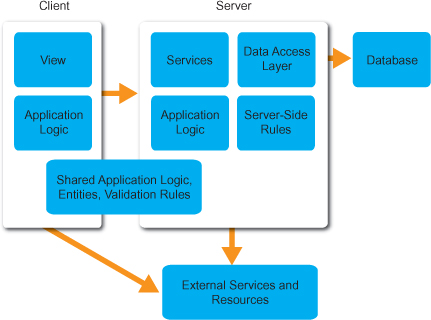
WCF RIA Services applications are similar to traditional Silverlight applications in that there’s both a client application and a home server. The server serves up the Silverlight application and also contains the services the application is to use. RIA Services works with multiple-server and multiple-client scenarios; but as mentioned in the introduction, the typical scenario is one server per application domain. Figure 17.1 captures this typical architecture at a high level.
At first glance, the architecture looks like any other Silverlight application, except for that odd shared bit. That’s one of the many things that make RIA Services worth the effort to learn.
RIA Services includes strong support for creating client-side proxies and entities that preserve, with high fidelity, the validation rules and logic written on the server. As a developer, you only need to write the code once, and RIA Services will take care of the rest. We’ll cover this in depth later in the chapter.
In this section, we’ll look at the tooling that makes RIA Services work. Then, we’ll dive right in to creating a new project using the Silverlight Business Application template, a WCF RIA Services version of the navigation template we covered in chapter 15. You’ll build on this project throughout the rest of the chapter.
The main body of code that is generated falls under the Generated_Code folder on the Silverlight application. This includes a single .g.cs file with all the context and proxy classes, and one or more subfolders with the additional model classes. Because this code is autogenerated, you won’t want to change it. But having the source code available is useful when you’re trying to understand exactly what RIA Services is doing in the client application, or when you’re involved in complex debugging.