concept value converter in category silverlight

This is an excerpt from Manning's book Silverlight 4 in Action: Silverlight 4, MVVM, and WCF RIA Services.
XAML allows you to represent almost anything using the object element and property attribute syntaxes. But some things can get cumbersome to do that way. For that reason, XAML includes the concept of extensions in the form of markup extensions and type converters. Silverlight also includes the concept of a value converter but, because that’s used almost exclusively with binding, we’ll cover it in chapter 11.
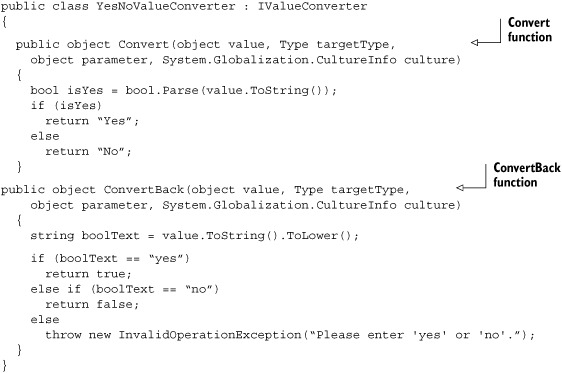
To create a value converter, you must create a class that implements the IValueConverter interface, which enables you to create some custom logic that transforms a value. This transformation may take place in one of two methods depending on the flow of your data. The first method, Convert, is used when the data is moving from the source to the target—for example, from your object to a TextBox. If the data is flowing from the target back to the source, such as when the value entered in a TextBox goes back to your object, a method called ConvertBack is used. Both methods are members of the IValueConverter interface. This interface and its methods are demonstrated in listing 11.8.
This listing shows a value converter that converts between a bool and Yes or No. This converter uses the Convert method when data is being bound to your UI. It’s this method that converts a bool to Yes or No. When the UI is passing data back to its source (TwoWay binding), the ConvertBack method is used. This method converts Yes to true and No to false. These methods control the conversion process. To assist in this process, both these methods give you the opportunity to provide custom information.
Both the Convert and ConvertBack methods allow you to use two optional pieces of information. The first is an arbitrary object called parameter that can be used by your conversion logic. By default, this object will be null, but you can set it to any value that you find useful. The other piece of information specifies the CultureInfo object to use when converting the values. We’ll discuss both parameters in a moment. But, to set the CultureInfo or pass along a custom parameter, you first must know how to use a value converter from markup.
Value converters are powerful and allow you to extend binding to support scenarios not natively supported in Silverlight or let you manipulate object data for objects that may otherwise have schemas you can’t touch.
For example, a colleague created a value converter that has a field name as a parameter and then implements binding to a dictionary of fields, much like a DataSet. At the time, Silverlight had no support for binding to indexed values, so this was a huge timesaver and allowed us to use existing business objects (which included a dictionary of additional values) in case we couldn’t alter the implementation of the existing objects.
Since MultiBinding (the ability to bind two fields to a single control) isn’t supported in Silverlight, in another instance we used a purpose-built value converter to combine all the address fields in an object into a single string to be displayed in a grid column. In that case, the binding source was the entire object and the value converter looked for specific fields in that object. The ConvertBack method was left empty in that case, since it supported only OneWay binding.
Though you don’t want value converters to be the solution to all your binding woes (in many cases, an alternate design may serve you better), they’re powerful enough to provide lots of options in situations where you may be otherwise tempted to write a bunch of code in your code-behind.
Creating and using a value converter can be valuable when working with data, as shown with our basic yes/no example. Value converters can be useful in even more complex scenarios. For instance, Silverlight doesn’t have support for HTML tags in regular text controls, so you may consider using a value converter to scrub the HTML tags from a string before binding it to your UI.