concept anything in category software development

This is an excerpt from Manning's book Writing Great Specifications: Using Specification by Example and Gherkin.
This process is sometimes simplified into a three-step loop: red-green-refactor. Most test runners mark failing tests in red and passing tests in green. You start with a red test and gradually work to make it a green one. As soon as you get a green test, you refactor the code to polish it, and then you use the tests to be sure you didn’t break anything while making your implementation more beautiful.
Listing 3.14. Warm-up narrative
"If your story is ready for rewrite, cut it to the bone. Get rid of every ounce of excess fat. This is going to hurt; revising a story down to the bare essentials is always a little like murdering children, but it must be done." —Stephen King Writing is hard. Many authors struggle to get anything done. There's something terrifying about a blank page, but there's something terrifying about an unrevised page, too. What can you do to make a writer's life easier?
Anything can be a feature. A single button, like the Share button in Facebook, can be a feature. A new screen, such as a user profile, can be a feature, too. Even a brand-new module (like a simple payment system) can be a feature. The word feature is often nothing more than an umbrella term for anything that’s being added to the product. A reasonably sized feature can change as the product evolves. If a feature turns out to be more important than you initially thought, it will grow larger—and so will its feature file. The question is, how do you split it? Unfortunately, there’s no clear answer, because, once again, anything can be a feature. Without a clear methodology in place, your team may split features differently each time a similar problem appears. (Goodbye, consistency.) Nonetheless, it’s easy to understand why Cucumber-flavored Gherkin uses features as the default option. If anything can be a Gherkin feature, people who only recently started using the language will be less intimidated by it. At first, this choice can facilitate faster learning. (It’s also the reason previous chapters used the Feature keyword. I warned you in chapter 2 not to become too attached to it!) But as you write more scenarios, and your specification suites become larger, you’ll realize that organizing scenarios by features may not be the best idea. Let’s look for something better.

This is an excerpt from Manning's book Continuous Integration in .NET.
Pick a directory to work with. By default, Visual Studio stores projects somewhere deep in the user folder structure, which makes all the paths long and error prone. It’s better to make the path shorter—anything on the first level in the directory structure will do, such as C:\Project, C:\Development, or C:\Work. For this example, let’s use C:\Dev.
One more thing is especially important if you’re considering setting up a CI process. The golden rule of CI says to keep all the files you need to fully integrate your software in the project directory. You should keep not only your source but also all the tests and third-party tools and libraries you use—literally everything you need for full integration, including executables for documentation generation, installation, and deployment. Now, think about this project directory residing in your source control system. You can point new developers to one place and have everything ready for them to pull and start to work. They don’t need to install anything extra to start compiling, testing, and working. The same setup applies to the CI process. You can point it to the same place every developer uses, and it can do the work it’s designed for, wherever it’s installed. Not bad, eh?
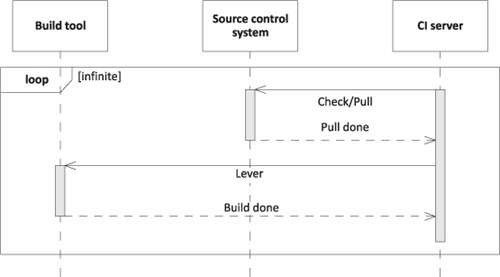
Figure 4.2. The CI server in action. It checks whether anything new is on the source control server. If so, it pulls the code and uses the lever to start the build. The whole process is enclosed in an infinite loop. Whenever the software developer pushes anything into the source control repository, sooner or later it’s integrated.