concept artifact in category software development

This is an excerpt from Manning's book Agile ALM: Lightweight tools and Agile strategies.
Controlling, versioning, and resolving conflicts for artifacts of any type (which impact the release) that may change over project time
“In general, as much as I spend time handling integration between .NET and Java systems, I’m not a huge fan of mixing the developer tools across those two platforms—trying to get Maven to build .NET artifacts, for example, can be a royal pain to get right. In general, the best success I’ve had with this is to fall back to MSBuild, and kick it off as you would any other command-line tool. The build results can be captured to a text file and examined later, or if a more fine-grained control is needed, a shell around MSBuild can be built (probably with PowerShell, depending on the complexity of the problem) to capture events during the build. This doesn’t mean I’m going to tell .NET developers to stick with plain-vanilla Visual Studio or TFS, mind you. Better tools definitely exist for handling continuous integration builds than what comes out of the box. Pick one of those CI tools, figure out how to invoke a command-line tool from the CI infrastructure, use that to kick off MSBuild, and call it a day.”
Integrating Jenkins with Artifactory has many appealing benefits. The most obvious advantage is that your CI server should deploy artifacts to a component repository, such as to Artifactory. But there are more advantages.
By integrating those two tools, you profit from atomic deployments of build artifacts. Additionally, the integration better links built and deployed artifacts to build jobs. Linking artifacts to builds enables Artifactory to semantically group binaries so that you can operate commands on the semantic group of artifacts, instead of operating commands on single, loosely coupled artifacts. A common command that you’ll want to apply on a group is staging the group of artifacts.
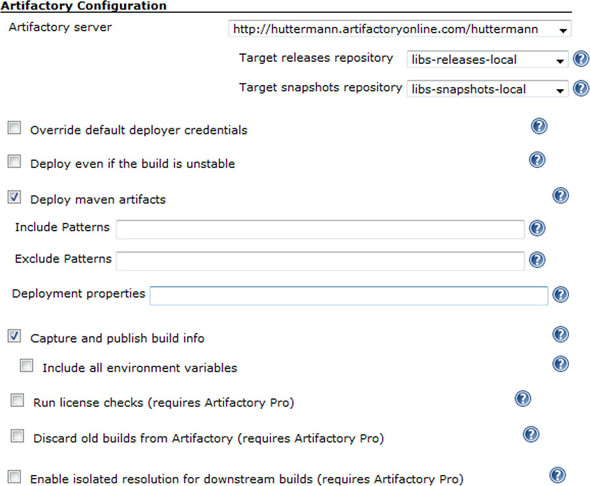
In your build job in Jenkins, configure your build section to run mvn cleaninstall. This will install the artifacts to a Jenkins repository, from which Jenkins deploys the artifacts to Artifactory. In your build job in Jenkins, configure a postbuild action to deploy artifacts to Artifactory (after the full build goes through successfully). In your build job in Jenkins, in the Artifactory Configuration section, select the Artifactory server, the target repositories for releases and snapshots, and check boxes to deploy Maven artifacts and capture and publish build info (see figure 7.17). Jenkins offers a drop-down list for scanning all available repositories. Double-check that you have the deployment permissions on the target repository (in Artifactory) and that the credentials are set correctly (in Jenkins). The Artifactory plug-in for Jenkins also includes a link on the Jenkins user interface to redeploy artifacts to Artifactory at any time. Figure 7.17. Configuring the integration of Jenkins with Artifactory. Jenkins resolves the central settings that you’ve set on the Jenkins configuration page and suggests valid entries for Artifactory server and target repositories. In this example, Jenkins will deploy artifacts to Artifactory after all single Maven modules are built successfully. It will also capture build information and pass it to the Artifactory server. Help texts are available on demand for all configuration settings (by clicking the question marks).