concept change in category software development

This is an excerpt from Manning's book Agile Metrics in Action: How to measure and improve team performance.
How fast are you delivering changes to your consumer? How fast can you deliver changes to your consumer?
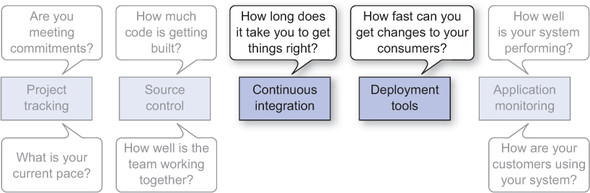
Done means a task is complete. Despite the seemingly simple definition, done can be a tough thing for the business and the agile team to figure out and agree on. Because the data in your PTS associates time with tasks, the criteria for which tasks are complete are key because they determine when to put an end time on a task. Often, done means that the task in question is ready to deploy to your consumers. If you group lots of changes into deployments and have a separate process for delivering code, then measuring the time it takes to get ready for a deployment cycle makes sense. If you move to a model where you’re continuously deploying changes to your consumers, it’s better to categorize tasks as done after they’ve been deployed. Whatever your deployment methodologies are, here are some things to consider when defining done for your team’s tasks:

This is an excerpt from Manning's book Git in Practice.
To do anything useful in Git, you first need one or more commits in your repository. A commit is created from the changes to one or more files on disk. The typical workflow is that you’ll change the contents of files in a repository, review the diffs, add them to the index, create a new commit from the contents of the index, and repeat this cycle.
You’ve reapplied the changes from the last git stash save.
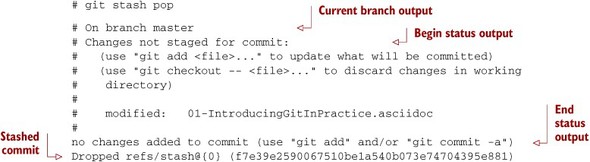
You may have stashed changes with the intent of popping them later, but then realize that you no longer wish to do so—the changes in the stack are now unnecessary, so you want to get rid of them all. You could do this by popping each change off the stack and then deleting it, but it would be handy to have a command that allows you to do this in a single step. Thankfully, git stash clear does just this.
Listing C.1. ~/.gitconfig
[include] path = ~/.gitconfig-user [color] # Colour terminal command output when possible. ui = auto [gist] # Open GitHub Gist in browser after submission. browse = true [push] # Push to the set upstream branch being tracked by default. default = simple [fetch] # Always prune when fetching (and pulling). prune = 1 [rerere] # Store and re-use manual conflict resolution changes. enabled = 1 [core] # Exclude everything this file. Used for general exclusions. excludesfile = ~/.gitignore # Set attributes on files. Used for general diff improvements. attributesfile = ~/.gitattributes [help] # Open Git help pages in the browser as HTML. format = web autocorrect = 1 [alias] ## 'New' Commands # Stage the changes in a given file. stage = !git add -u # Unstage the changes in a given file. unstage = reset HEAD -- # View the current changes in the staging area. staged = diff --cached # Print the name of the current branch. current-branch = symbolic-ref --short HEAD # Print the name of the current upstream tracking branch. upstream = !git config --get branch.$(git current-branch).remote \ || echo origin # Cherry-pick a commit with your signature. sign = cherry-pick --signoff # List all current SVN externals for this repository. svn-externals = !git svn show-externals | grep -x \\"[^#].*\\" # Create a git:// server of the current repository. # WARNING: this gives all users read/write access # without authentication (so only use on trusted networks). serve = !git daemon --reuseaddr --export-all --base-path=. \ --verbose ./.git # Merge a branch and commit a merge commit (even if one # isn't needed) noff = merge --no-ff # Merge a branch with a merge commit and resolve any conflicts # always using that branch's version rather than the current branch. theirs = !git noff -Xtheirs # Fetch all branches and rebase the current branch against # upstream/master. rebase-against-master = !git fetch --all \ && git rebase $(git upstream)/master # Push the current branch upstream to origin using the same branch # name for the remote branch. upstream-current-branch = !git push --set-upstream origin \ $(git current-branch) # Create a pull request on GitHub using the `gh` command. pull-request = !git upstream-current-branch && gh pull-request # Upstream the current branch to origin and create a pull request # on GitHub. upstream-and-pull-request = !git upstream-current-branch \ && git pull-request # Get the current diff but show differences between characters # instead of just the differences between lines. word-diff = diff --word-diff # Push the current branch and set it as the default upstream branch. push-and-set-upstream = push --set-upstream # Create a new branch by checking out another branch. checkout-as-new-branch = checkout -b # Rebase against origin/master and prompt for what operations # should be performed. interactively-rebase-against-origin-master = \ !git rebase --interactive origin/master # Show the commit log with a prettier, clearer history. pretty-one-line-log = log --graph --oneline --decorate # Commit any changes to files, squash them into the last commit # and update its date. fix-up-previous-commit = !git commit --all --amend \ --reuse-message=HEAD --date=\"$(date)\" #" # Checkout the staging branch and update it. pull-staging = !git checkout staging && git pull # Checkout the master branch and update it. pull-master = !git checkout master && git pull # Update the staging, master and current branches. pull-master-staging-and-current-branch = \ !BRANCH=$(git current-branch) && git fetch --all \ && git pull-staging && git pull-master && \ git checkout $BRANCH && git pull # Commit a work-in-progress commit (to use with # fix-up-previous-commit) work-in-progress = commit -a -m 'WIP' # Merge a branch with a merge commit and use the more time-consuming # patience diff algorithm patience = !git noff -Xpatience # Hard reset branch to the upstream version. hard-reset = !git reset --hard $(git upstream)/$(git current-branch) # Assume the specified file is unchanged to stop changes # being seen by Git assume = update-index --assume-unchanged # No longer assume a specified file remains unchanged unassume = update-index --no-assume-unchanged # List all files that are assumed to be unchanged assumed = !git ls-files -v | grep '^[hsmrck?]' | cut -c 3- ## Shortened 'New' Commands fahr = !git fetch --all && git hard-reset rem = !git rebase-against-master wip = !git work-in-progress pr = !git upstream-and-pull-request up = !git upstream-current-branch pm = !git pull-master-staging-and-current-branch fa = !git fetch --all w = !git word-diff u = !git push-and-set-upstream b = !git checkout-as-new-branch i = !git interactively-rebase-against-origin-master # `true` needed as the return status is wrong otherwise. l = !git pretty-one-line-log || true f = !git fix-up-previous-commit ## Shortened Existing Commands p = pull s = status --short --branch [instaweb] # Use the Ruby WEBRick library when creating a `git instaweb` # HTTP server. httpd = webrick [diff] # Use the OS X graphical three-way merge tool for graphical diffs. tool = opendiff # Use the slower but better patience diff algorithm algorithm = patience [diff "xml"] textconv = xmllint --format --recover [difftool "opendiff"] # Set the OS X opendiff command name. path = opendiff [merge] # Use the OS X graphical three-way merge tool for graphical merges. tool = opendiff [mergetool] # Don't prompt before opening the merge tool. prompt = false # Don't keep backups of the merge tool inputs. keepBackup = false # Don't keep the merge tool temporary input/output files. keepTemporaries = false [mergetool "opendiff"] # Use a script to setup opendiff correctly for Git merges. path = git-mergetool-opendiff [apply] # Cleanup whitespace by default when apply patches. whitespace = fix [url "git@github.com:"] # Always use GitHub SSH protocol to push. # Allows use of git:// for public repositories with push access pushInsteadOf = git://github.com/ [url "https://github.com/"] # Use HTTP for GitHub instead of git:// or git@ # Enable this in networks where git:// or git@ are blocked. #insteadOf = git://github.com/ #insteadOf = git@github.com: [url "git@github.com:"] # Use SSH for GitHub instead of https:// # Enable this in networks where https:// has issues. #insteadOf = https://github.com/ [url "git@gitorious.org:"] # Always use Gitorious SSH protocol to push. # Allows use of git:// for public repositories with push access # (which is often faster). pushInsteadOf = git://gitorious.org/ [credential] # Use OSX Keychain to store HTTP passwords. helper = osxkeychain [filter "media"] clean = git-media-clean %f smudge = git-media-smudge %f [gh] protocol = https

This is an excerpt from Manning's book The Mikado Method.
Figure 1.3 shows what the Mikado Method looks like in a compound format. It shows our recommendation for performing changes to a system that’s too large for analyze-then-edit, which means basically any production system in the world. Let’s go through the steps of the process one by one.
It can help you get an idea of how big the change is—we’ve already discussed how the Mikado Method can make changes of any size more manageable (even though it gives the most benefit when applied to medium- to large-scale improvements).
The single, most telling sign of the scope of a change is the size of the Mikado Graph. If the graph contains less than a dozen nodes, and the content of each node is relatively fine-grained, we consider that change to be small. Fine-grained means smaller refactorings, like “Introduce parameter,” “Change method signature,” and the like. If the graph contains more than a dozen nodes, or if the prerequisite nodes include more work than two to four refactorings each, it’s a sign that the change is quite big. Coarse tasks or big graphs (or both) indicate a medium-to-large change and a lot of work.
Of course, when the graph doesn’t grow anymore, you’ve found the prerequisites, which is the major part of the work. Hence, to estimate how large a change is before the entire graph is complete, you usually have to get a feeling for how much the graph is growing and assess your prerequisites, in order to guess how big the change is getting.

This is an excerpt from Manning's book Kanban in Action.
“Adam likes to work his way. He doesn’t like change—change means regression testing.”
Switch: How to Change Things When Change Is Hard (Chip Heath and Dan Heath, Crown Business, 2010, http://amzn.com/0385528752)—This book teaches you about making changes: personal changes, helping others change, and changes to organizations. It gives you a practical framework for making changes and contains loads of examples and studies to back it all up. This book made us feel almost as though we were cheating by knowing all these techniques when we’d finished reading it. You can get that feeling, too!

This is an excerpt from Manning's book Agile ALM: Lightweight tools and Agile strategies.
Tracking the progress of the development efforts, and the changes on artifacts, including source code, design, and requirements documents, isn’t always easy because it usually requires working with manual lists and accessing multiple data repositories. What makes implementing SCM even more difficult is the amount of manual work required, particularly for validating the current status of the software at any given point.
Technical release management is an explicit time-consuming activity. The solution was to focus on automating every aspect of SCM, from application builds to release packaging and deployment. For example, development managers need procedures for continuous auditing and change tracking. The release management process should be implicit, integrating across artifact types and development phases, with uniform or highly integrated tools and data repositories.
As a result of improved procedures for continuous auditing and change tracking, developers found themselves with a more integrated approach that was free of common obstacles. Instead of each organizational group suboptimizing its own work, barriers between areas were broken down and all stakeholders worked as a team for the company.[4] I refer to this approach as being “barrier-free.” Figure 1.4[5] shows that SCM became more and more an implicit task embedded in all development phases. At this point, it becomes more appropriate to talk not only about SCM, but also about management of the application lifecycle (ALM).
With a task-based (or task-focused) approach, the task is the unit of interaction and the base of work. Task-based development is the technique of linking work items (issues, defects, tasks, and so on) to the specific set of changes (such as an atomic changeset) made to complete the work described in the work item. For example, if you’re fixing a defect that’s listed as defect 4711 in JIRA, task-based development requires that you link the exact set of changes to defect 4711 in JIRA.
Task-based development is powerful and significantly improves your productivity by making it easy to track changes to the approved change request that authorized the modification. Working in a task-based way, the functional and technical consistency of releases is improved.
Figure 4.2. This toolchain enables task-based development. It’s based on JIRA, FishEye, Subversion, Bamboo, Eclipse, and Mylyn. Requirements are managed with JIRA. GreenHopper enriches JIRA with further features for Agile development. The CI server pulls sources from the VCS to build the software. FishEye is a convenient VCS browser that makes changes visible in a convenient way. Both Bamboo and FishEye are integrated with JIRA. Developers use Eclipse with Mylyn to work on code; they access code with Eclipse and the plug-in that’s available to connect to the VCS that’s used.

Task-based development is valuable when you’re coordinating the changes of a large team of developers who may be located in one place or distributed across several locations. Managing the changes of a group involves handling complex dependencies, and it demonstrates the value of continuous integration.
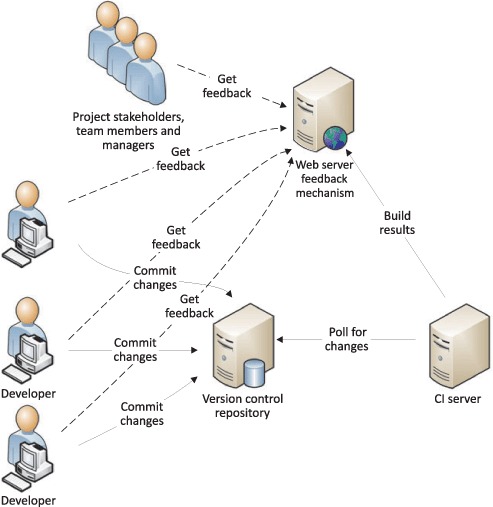
For example, suppose you want to commit your changes to the Subversion (SVN) repository. Before you do so, you should update your sandbox (your workspace) with incoming changes. Afterward, you need to ensure that your classes compile and your tests run successfully (including all of the required quality gates, such as static code analysis). Other developers are also refreshing their sandboxes and committing their changes to the repository at the same time. Each commit causes the Subversion repository revision number to be incremented by one and the changes to be documented in the log.
Once all specified features are implemented, the release is finished, and the changes from each member of the team are successfully integrated, one developer (often the lead developer) should tag the revision of the code, which creates a baseline. This is often done in the code freeze phase, as you learned in the previous chapter. Some teams use branches to help organize their work (especially when they’re close to a release). Your colleagues can always see what you have changed, and by browsing the changelog, they can see the set of changes that was committed to fix a particular bug or implement a feature.
import org.specs2.mutable._
object CocaColaMachineSpec extends Specification {
  "coca-cola machine" should {
   "sell one can and return change" in {
   }
   "not sell can because of wrong price and return all money" in {
}
   "not sell can because of missing cans and return all money" in {
   }
  }
}

This is an excerpt from Manning's book Specification by Example: How Successful Teams Deliver the Right Software.
Their living documentation system made the team confident that the new system would work the same as the old one when the change was complete. It also enabled Brissette to manage and track the project’s progress.
The team at Songkick, a London-based consumer website about live music, used a living documentation system to facilitate change when redeveloping activity feeds on their site. They had realized that the feeds were implemented in a way that wouldn’t scale to the required capacity; living documentation supported them when they were rebuilding the feeds. Phil Cowans, the CTO of Songkick, estimates that the team saved at least 50% of the time needed to implement change because they had a living documentation system. According to Cowans,

This is an excerpt from Manning's book Continuous Integration in .NET.
2. Make changes to the code.
One thing that drove this change was Microsoft’s desire to encourage VSS users to move to TFS Version Control, which is a part of the TFS family of tools. The old VSS is infamous (for good reasons or not) for its instability. A corrupted repository is the last thing you want to experience after a hard day of work. And the sad truth about VSS is that corruption happens way too often. TFS Version Control can’t be compared to VSS: it uses a completely different file-access mode (changes are transactional), and it uses SQL Server as its repository. You can also use SQL Server Express. TFS scales safely to a large number of users. Now that it isn’t so expensive, you definitely should give it a try.

This is an excerpt from Manning's book Becoming Agile ...in an imperfect world.
Quecreek also reinforces another agile tenet: you should expect change, you should embrace change, and you should be ready to plan and adapt frequently. The Quecreek rescuers adapted to broken drill bits, gas lines blocking their path, and the need to reduce the time required to create a fishing device. In software development, you encounter similar situations. You discover a missing requirement, you identify a technical constraint that prevents you from following your initial design, or a third party delivers their part of the project later than expected. These types of issues happen on every software project; and to ensure success, agile asks you not to be surprised but to continue to perform by adapting to the reality of the situation.
No matter what methodology you use, you’ll always have to deal with issues and challenges during development. Your advantage is that you’re expecting change and you have tools and processes in place that support and embrace adaptation.
Managing changes and decisions during development is still a difficult feat. You’re trying to stay on schedule, meet the customer’s needs, and support nonfunctional requirements such as performance needs. Discoveries require diligent, collaborative decision making. You’ll refine requirements, reprioritize the work, and re-plan based on what you encounter.
Another example that comes to mind is desktop search functionality. Many people started using Google’s desktop search utility a few years ago. The utility was superb and free. It was a great marketing tool for the Google brand. We’re confident the folks at Microsoft cringed at seeing Google invade their world and be successful. We believe desktop search was a medium-priority feature at Microsoft, with no urgency to get it to market. Google changed all that with its success; 2 months later, Microsoft released its own desktop search utility. We believe Microsoft adapted to the change in the competitive climate and reprioritized the feature midstream, moving it up to an earlier iteration/release.
Here are some ways we see teams adapt to a change in the business climate:

This is an excerpt from Manning's book Test Driven: Practical TDD and Acceptance TDD for Java Developers.
Figure 1.9. The emerging, evolutionary design of a system is influenced by both anticipated and unanticipated change. It’s worth noting, though, that a significant amount of anticipated change doesn’t happen—or happens in a different form than expected, essentially making it unanticipated change. Our job is to apply common sense and good judgment when preparing for change that we know will happen. A lot of such change never does.
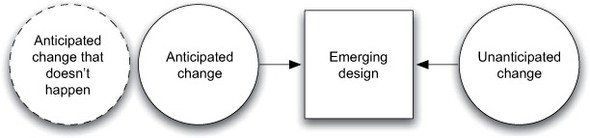
Then again, these needs don’t tend to come to developers as a complete surprise. Although changes in requirements are generally something we cannot anticipate, the developers often see beforehand that certain evolution is going to take place at some point, in light of the known requirements. We could call this anticipated change. As figure 1.9 points out, though, anticipated change is not guaranteed change. Some anticipated change never happens, and some may quickly turn to unanticipated change as the various unknowns reveal surprises.
Figure 1.9. The emerging, evolutionary design of a system is influenced by both anticipated and unanticipated change. It’s worth noting, though, that a significant amount of anticipated change doesn’t happen—or happens in a different form than expected, essentially making it unanticipated change. Our job is to apply common sense and good judgment when preparing for change that we know will happen. A lot of such change never does.
Evolutionary design does not mean using common sense is prohibited. The developers should make use of what they know within the limits of common sense, with awareness of the uncertainty of change itself, and while keeping in mind what the priorities are.
In general, change is easiest to initiate at natural change boundaries rather than in the middle of an activity such as a software project, especially if the group’s ability to absorb risk is already lowered due to an external pressure of some kind.
Some of the more obvious natural boundaries for change include the beginning of a new project, a new release, or pretty much any restructuring of the team. Other less ideal but nonetheless attractive natural boundaries can be iteration boundaries, holiday seasons, or even off-site team events.
Perhaps the most common relationship of influence during a change is a senior staff member mentoring a junior staff member (note that “junior” does not necessarily mean younger). The formal role of the senior individual might be a tech lead, a project manager—even a business manager. Motivating junior colleagues and supporting their personal adoption processes is naturally made easier because of the leadership brought by seniority, be it through years of experience or merely through organizational hierarchy.