concept component in category software development

This is an excerpt from Manning's book Test Driven: Practical TDD and Acceptance TDD for Java Developers.
We’ll be using JUnit and Java in this book. In fact, we’ll be using plenty of extensions to JUnit as we go about test-driving different kinds of components. If you’re not familiar with JUnit, please refer to the appendices for an introduction to this wonderful little tool. Don’t get too immersed in the details of JUnit, though, because we’ve got a couple of additional categories of tools to talk about—for example, the kind of tools we might look to for support in implementing acceptance TDD.
The components are usually[9] laid out in HTML pages using a template language. These components and templates are sometimes accompanied by additional configuration files (usually XML), which provide mapping information for the framework so that the framework knows which component to bind to which placeholder in the template, which other resources the component needs to be hooked up with upon initialization, and which client-generated events should be routed to which method on which component instance. Some frameworks make heavy use of Java 5 annotations for centralizing this additional configuration into the same source files where the developer implements the component. Wicket goes as far as representing pages in the web application as Java classes, making the HTML templates the only non-Java artifacts to deal with, except for our good old friend, web.xml, of course.
9 JSF templates are pretty much markup agnostic in the sense that pages consisting of components can often be rendered not just to HTML but also to alternative markup languages without changes to the template.
One way in which the attention given to testability within the Wicket project is showing is the existence of tools such as the WicketTester class that’s part of the Wicket distribution. WicketTester is essentially a testing tool for running our Wicket pages and components outside of a web container. In order to see WicketTester in action, let’s write a little test for our home page. Listing 5.28 shows a regular JUnit test class making use of the WicketTester.
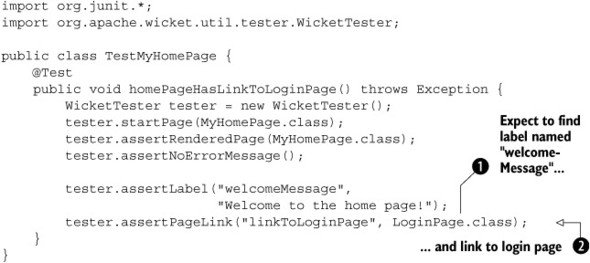
Adding components on a page in Wicket involves two tasks. First, we need to add the component in the page class, and then we need to add a bit of markup into our HTML template so Wicket knows where to render the component. Listing 5.31 shows how we add the Label and PageLink components to the MyHomePage class.
Listing 5.31. Adding components to our home page
import org.apache.wicket.markup.html.WebPage; import org.apache.wicket.markup.html.basic.Label; import org.apache.wicket.markup.html.link.PageLink; public class MyHomePage extends WebPage { public MyHomePage() { add(new Label("welcomeMessage", "Welcome to the home page!")); add(new PageLink("linkToLoginPage", LoginPage.class)); } }