concept Eclipse in category software development

This is an excerpt from Manning's book Agile ALM: Lightweight tools and Agile strategies.
This chapter will examine task-based development by providing numerous compelling examples. Tools aggregate knowledge and improve traceability and visibility. They aggregate content and provide views to improve the release process. I will describe toolchains consisting of JIRA/GreenHopper, Bamboo, Eclipse, FishEye, Mylyn, and a product called Trac, which provides much of the same functionality. You might be using a different set of tools in your organization, but you’ll likely find that the functionality described is similar.
The IDE is the place where developers implement the requirements. We’re using Eclipse in this toolchain, and we can add further Eclipse plug-ins to this Eclipse configuration to access the VCS. In this toolchain, we want to connect to a Subversion repository. The Subclipse plug-in is a good choice for interacting with the repository, and you can install it via the Eclipse update manager.
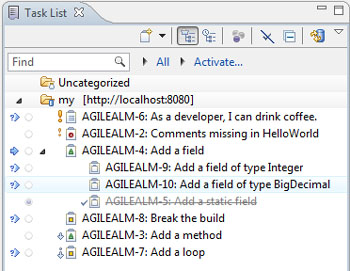
Mylyn is an Eclipse-based task framework. It can integrate with ticket and bug-tracking tools such as JIRA, Bugzilla, Trac, and Mantis. After installing Mylyn with the appropriate ticket system connector for JIRA, and configuring it to connect to your task repository by providing the URL and credentials to login, an additional view is added to Eclipse, showing all tasks matching your search criteria, as shown in figure 4.5. Once your tasks are integrated, Mylyn monitors your work activities and synchronizes with the ticket system automatically. You can reference parts of the sources you’re working on in Eclipse as the context of a task. This context can be attached to the task or even posted as an attachment to the ticket.
Figure 4.5. Mylyn adds a task-based view in Eclipse. In the Eclipse task view, important information about the tasks (such as issue type, status and priorities) are shown directly, but double-clicking will open the complete ticket in your Eclipse editor. Tickets can be grouped by relationships of subtasks. In the left area, incoming and outgoing changes made by you or other developers are identified with icons. Unread tickets—tickets that haven’t been opened yet—are identified with a question mark.