concept feedback in category software development

This is an excerpt from Manning's book The Mikado Method.
An experiment is a procedure for making a discovery or establishing the validity of a hypothesis. In the Mikado Method, you use experiments to change the code in order to achieve the goal, so that you can see what parts of the system break. Whatever breaks gives you feedback on the prerequisites needed before you can achieve the goal. A typical experiment would be to move a method from one class to another, extract a class, or reduce the scope of a variable. The goal and the prerequisites are what you visualize.
Another way to get feedback from your code is running it in a debugger. A useful debugging environment provides means to inspect the state of your code and data and also allows you to analyze it at a pace that suits you. There are pros and cons with debugging, but it’s definitely something we do from time to time.

This is an excerpt from Manning's book Continuous Integration in .NET.
The second and most important tool you need is one to drive your CI process. This sits on the CI server, watches for changes in the source code repository, and coordinates the other steps in the CI process. It also allows on-demand builds to be made. Essentially, this application is the traffic cop of any CI system. The CI server software typically has its own feedback mechanism that’s used to aggregate feedback from the other tools and provide it to the feedback mechanism.
It’s sometimes good to diversify the communication routes from your CI process to the developer. Some people prefer to use tray icons, some want to have the integration feedback within the development environment, and others like to use toys with visual effects. Sometimes it’s advisable to diversify the feedback even more; what if you want to be informed about a failing build when you aren’t online?
If the build fails, the feedback should be clear about where it failed and why. Information about a problem with the build is useless if you can’t see where the problem is so you can react and clean it up.
In this chapter, we’ll look at various feedback mechanisms provided by the three CI servers—CCNet, TeamCity, and Team Foundation Server (TFS)—that we’ve been looking at in this book. The feedback will be provided by web pages, email, and a couple of surprises that we’ll save for later in the chapter. We’ll show you how to provide immediate feedback mechanisms with tray icons or instant-messaging notifications, and you’ll send an email notification. We’ll look at detailed build reports to find out why a build failed. You’ll make the feedback more visual and send it to developers who are offline. First, let’s get the build status.

This is an excerpt from Manning's book Becoming Agile ...in an imperfect world.
Deliver working software frequently, from a couple of weeks to a couple of months, with a preference to the shorter timescale. Have you ever shown your customer software for the first time and received no feedback? In most cases, you receive feedback—sometimes minor, but usually major. The trick is to deliver software early so that you can get feedback early. This early feedback can save you re-work down the road.
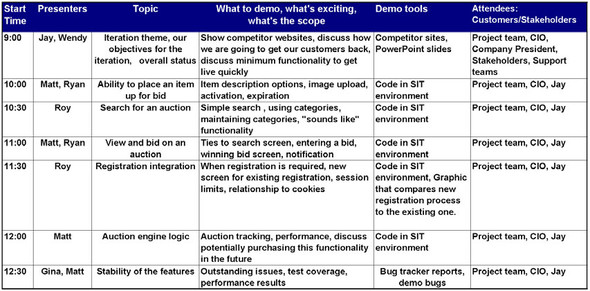
Figure 20.4. Acme Media demonstrates the iteration features during the team’s demo day. The demonstration synchronizes the company on the current state of the project and provides an opportunity for feedback. The entire team participates in the demonstration, with developers, designers, project managers, and testers describing status from their perspective.
Employee performance should be addressed by management away from the team. The whole team may realize where a person failed, and they can give the person feedback during the project, but the retrospective isn’t meant to address personal performance issues.