concept FitNesse in category software development

This is an excerpt from Manning's book Agile ALM: Lightweight tools and Agile strategies.
FitNesse (http://www.fitnesse.org/) is a free, standalone wiki-based tool that integrates with Fit (and with another test system called SLIM). FitNesse allows you to write your tests in a wiki syntax instead of plain HTML tables. More about FitNesse in section 8.4.
FitNesse started as a tool to make Fit more accessible by adding a wiki frontend to it. It’s implemented as a simple web server and wiki with a page editor and wiki syntax that’s easy and quick to learn. It also provides a runtime environment for the tests.
New wiki pages are created as they are in many wikis—by typing the name of the new page in WikiWord (camel case) style in the URL. To tell FitNesse that this page is a test, click the Properties button in the left menu of the page and select the Test page type.
Installing and running FitNesse with GivWenZen
To get started with FitNesse and GivWenZen, download the latest zip file from the official web site (http://code.google.com/p/givwenzen/downloads/list), unzip the file into a folder, and run the command java -jar ./lib/fitnesse.jar.

This is an excerpt from Manning's book Continuous Integration in .NET.
Table 1.1. Some of the different types of builds you can do with CI
Build type
How it’s used
Continuous/Incremental Runs when code is checked in. Does a quick compile and unit test. Daily/Nightly Does a compile and full suite of unit tests and possibly additional testing such as FitNesse. Weekly Does a compile, full unit testing, and additional testing such as FitNesse. Release Creates an install set and then runs and tests the inst all process. QA Creates a build just for the QA team. Staging Builds and copies assemblies to a staging server.
Figure 7.15. The FitNesse home page. FitNesse is a wiki-style service that allows nontechnical users to write and perform acceptance software tests.
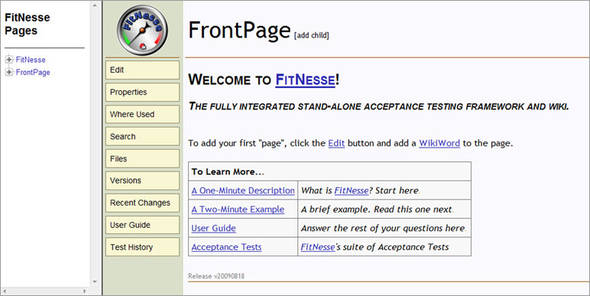
The next step is to prepare FitNesse to run .NET code. Download fitSharp from www.syterra.com/FitSharp.html. You’ll have to tell FitNesse where the .NET files are installed; to make the relative path short, copy the contents of the zip file to a dotnet folder next to your fitnesse.jar file. FitNesse.NET contains the files needed on both the client test side and on the FitNesse server side.
Drop the content of FitNesse.NET into the tools folder in your project, and reference a test project with fit.dll and fitSharp.dll. This assembly contains the fit.Column-Fixture class, which will be the base class for your test fixture.
Listing 7.10. A class that hooks up the financial library with FitNesse
namespace CiDotNet.Calc.Test.Math { public class FinanceColumnFixture : fit.ColumnFixture { public int duration; public int ppy; public double periodicInterestRate; public double presentValue; public double finalValue; public CiDotNet.Calc.Math.Finance.Mode mode; public double CalculateRate() { return CiDotNet.Calc.Math.Finance.CalculateRate( duration, ppy, periodicInterestRate, presentValue, finalValue, mode); } } }First, you inform FitNesse that you’ll be using the most common fixture that maps the test’s columns to the appropriate properties. You define the available properties and do the work. The input values from the test columns are passed to the financial library implementation.
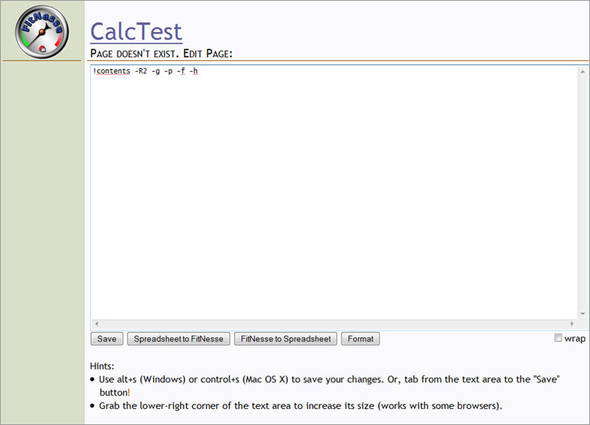
You’re good to go on the client side. Now, let’s define a test in FitNesse. To create a new wiki site with FitNesse, you must navigate to the application test page on your FitNesse server, such as http://localhost:8888/CalcTest (this test suite is included with the book’s source code). This page will host a test suite. You can have as many test suites as you wish; you just have to navigate to a new URL like http://localhost:8888/AnotherTestSuite. When the page opens in your browser, you’re presented with a new wiki site (see figure 7.16) that you can use to enter the FitNesse test.
FitNesse is a highly sophisticated acceptance test tool. Essentially, it’s a web server that hosts wiki-style web pages you can use as tests for your software. It’s a direct descendant of Framework for Integrated Test (Fit) by Ward Cunningham.
The basic idea of Fit and FitNesse is to give nontechnical users, such as end users and domain experts, the ability to write acceptance tests. The tests can be expressed in a table form that can be understood and managed by a customer or a domain specialist. The table-form tests are executed against a test runner, and the output is presented to the user. There’s no better way of learning than doing, so let’s jump in and try out FitNesse.