concept GitHub in category software development

This is an excerpt from Manning's book Agile Metrics in Action: How to measure and improve team performance.
Source control is where the actual work is done and collaboration across development teams happens. From here you can see which files are changing and by how much. Some source control systems allow you to get code reviews and comments, but in other cases you need additional systems to get that type of information. Tools like Stash, Bitbucket, and GitHub have rich REST-based APIs that can get you a wealth of information about your codebase. If you’re still using SVN or something even older, then you can still get data, just not as conveniently as Git- or Mercurial-based systems. In that case you may need something like FishEye and Crucible to get more data around code reviews and comments about your code.
This collaboration among developers is then saved as metadata along with the change. GitHub is an example system that has a rich API with all of this data that will help you get better insight into your team’s performance. The following listing shows an abridged example of data you can get from the GitHub API about a pull request.
There are a number of standard charts for SCM data for trending change. If you look at any GitHub project, you’ll find standard charts that you can get to through the Pulse and Graph sections. FishEye produces the same charts for SVN-based projects. As an example in anticipation of our next chapter, we’ll look at the GoCD repo in GitHub, which is the source for a CI and pipeline management server.
Figure 4.10. The Pulse page on GitHub gives you info on pull requests, issues, and amount of change. This is from the GoCD repo (github.com/gocd/gocd/pulse/weekly).
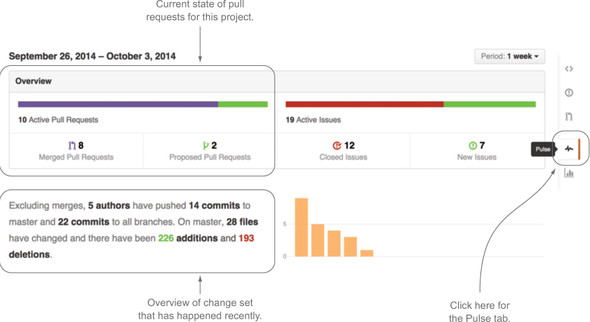
The Pulse tab is pretty cool, but just like checking your own pulse, it only tells you if the project you’re looking at is alive or not. In the context of GitHub, where open source projects tend to live, it’s important to know if a project is alive or dead so potential consumers can decide if they want to use it. To get data that’s more relevant for your purposes, check out the Graphs section. It has the typical breakdowns of CLOC and LOC that you’d expect to see from your source control project. Let’s start with contribution over time, shown in figure 4.11.

This is an excerpt from Manning's book Git in Practice.
GitHub provides more than just Git hosting that you can git push to and git fetch from; it also provides features that allow teams of individuals to collaborate on software projects in ways beyond those provided by Git itself. Two of these features are pull requests and forks. In this chapter you’ll learn about GitHub’s pull requests.
You’ve been working mostly from the command line in this book, and PRs are sometimes a core part of Git workflows, so it would be useful if you could also create PRs from the command line. Fortunately, a tool called gh lets you interact with GitHub from the command line (through the GitHub API). It’s available for download and provides installation instructions at https://github.com/jingweno/gh.
The gh command-line tool allows various interactions with GitHub by providing a wrapper on top of Git’s interface and adding new commands and improving the interaction of some Git commands with GitHub. For example, instead of running git clone https://github.com/GitInPractice/GitInPracticeRedux, you can run gh clone GitInPractice/GitInPracticeRedux to perform the same action of cloning a GitHub repository to your local machine.
Listing 12.1. Good commit message format
Commits: first line is a summary (<51 characters). Commit messages should be structured like emails. The first line (the commit subject) should be treated like the subject of an email. It should make a brief summary that is elaborated on in the rest of the commit message. It should have 50 characters or fewer and always be separated by a new line from the rest of the commit message body. Without this new line, various output formats that try to display only the first line of the commit may get confused. The commit's message body can be split into multiple paragraphs which should be wrapped at 72 characters or fewer. The wrapping is done to ensure the output of tools like `git log` remains readable even when it adds indentation for diffs. Otherwise the commit message has no other limits on length; it should be as long as it needs to be to fully explain the commit. While the subject might describe what the commit does, the body should expand on why the change was made. It should also use the present tense to match the tense used by commit messages generated by commands such as git merge. If you're using GitHub (and some other tools) then the contents of commit messages can contain Markdown. You may use Markdown to add some formatting that looks good in ASCII or rendered such as using **bold**, _italics_, ~~strikethrough~~, `monospace` or lists bulleted with a `*` or numbered with, for example `1.`. You shouldn't go overboard with this but it can add some useful, basic formatting.