concept Jenkins in category software development

This is an excerpt from Manning's book Agile ALM: Lightweight tools and Agile strategies.
Remember what we discussed in chapter 1. Your tool infrastructure should be flexible and open to changes. If you feel more comfortable with different tools in your toolchains, you can replace them with your favorites, keeping the rest of your tool-chain unchanged. Other toolchains are possible by integrating different tools of the same tool types. For instance, if you prefer Jenkins over Bamboo, you can easily replace that one specific tool in the overall chain either during initial setup or at any time later.
Jenkins jobs allow you to specify what you want Jenkins to build and to schedule when they should be built. Jenkins also specifies which artifacts should be procured as a result of the build. It also provides reporting on channels and a definition of what to do after the build has run.
Jenkins is a build server, so it doesn’t know how to build your project. You need build scripts, such as Maven, Ant, Ivy, MSBuild, and so on, to build your project,. Jenkins allows you to manage these build scripts (inside a Jenkins job) and run builds, depending on specific criteria.
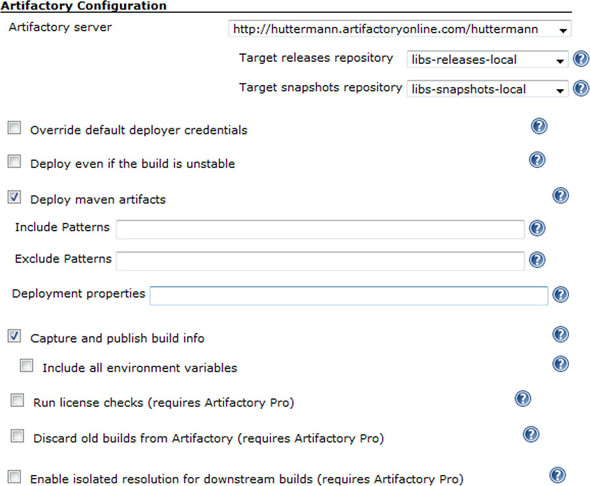
In Jenkins, configure your Artifactory server and user credentials in the Jenkins configuration panel. In your build job in Jenkins, configure your build section to run mvn cleaninstall. This will install the artifacts to a Jenkins repository, from which Jenkins deploys the artifacts to Artifactory. In your build job in Jenkins, configure a postbuild action to deploy artifacts to Artifactory (after the full build goes through successfully). In your build job in Jenkins, in the Artifactory Configuration section, select the Artifactory server, the target repositories for releases and snapshots, and check boxes to deploy Maven artifacts and capture and publish build info (see figure 7.17). Jenkins offers a drop-down list for scanning all available repositories. Double-check that you have the deployment permissions on the target repository (in Artifactory) and that the credentials are set correctly (in Jenkins). The Artifactory plug-in for Jenkins also includes a link on the Jenkins user interface to redeploy artifacts to Artifactory at any time. Figure 7.17. Configuring the integration of Jenkins with Artifactory. Jenkins resolves the central settings that you’ve set on the Jenkins configuration page and suggests valid entries for Artifactory server and target repositories. In this example, Jenkins will deploy artifacts to Artifactory after all single Maven modules are built successfully. It will also capture build information and pass it to the Artifactory server. Help texts are available on demand for all configuration settings (by clicking the question marks).