concept mouse click in category software development

This is an excerpt from Manning's book Test Driven: Practical TDD and Acceptance TDD for Java Developers.
Let’s go through the individual UI widgets shown in the design sketch one at a time. First of all, there’s a canvas on which the component should draw a series of plot points connected with straight lines. In the bottom-left corner of the UI are two text fields for typing in the X and Y coordinates for a new plot point; this adds a button with the text ADD on it for adding the plot point. In addition to the text fields and the button, the plot points drawn on the canvas should respond to mouse clicks, triggering the removal of the plot point in question.
We want the canvas to capture mouse clicks on it and to notify its container—the PlotMapViewImpl—about the event. To be more specific, we’d like the canvas to notify about only those mouse clicks that hit one of the plotted points. So how do we go about this?
First of all, we need some kind of a callback mechanism with which the view can register a handler for the mouse clicks. For this purpose, we create the PointEventListener interface:
We want our widget to respond to the user clicking our canvas with the mouse. In order to verify that this behavior is in place, we need a way to simulate mouse clicks. Luckily, the java.awt.Component class, which our canvas inherits from, offers a handy method called dispatchEvent. The dispatchEvent method can be used for simulating pretty much any kind of mouse event, including the simple left-click that we want.
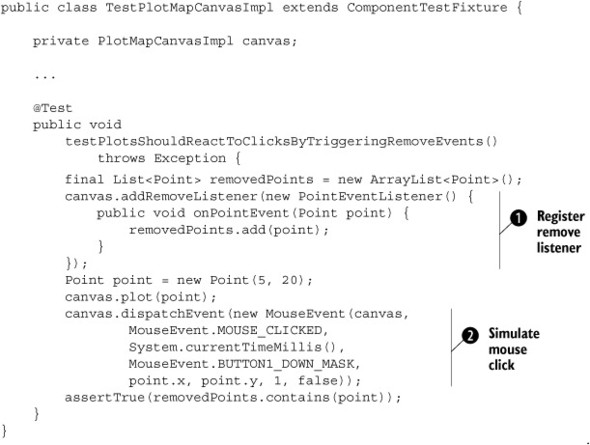
Listing 8.26 shows our next test, simulating a mouse click and registering a test double to listen for the expected remove events.
Our test in listing 8.26 is supposed to simulate a mouse click on a plotted point and verify that the proper event is delegated to the registered listener. It accomplishes this by
creating an anonymous implementation of our new PointEventListener interface that adds the received Points into a List. After registering the fake listener, our test
simulates a mouse click using the dispatchEvent method.
Listing 8.27. Canvas delegating mouse clicks to registered listener
public class PlotMapCanvasImpl extends Canvas implements PlotMapCanvas { ... public void addRemoveListener(final PointEventListener listener) { addMouseListener(new MouseAdapter() { public void mouseClicked(MouseEvent e) { listener.onPointEvent(e.getPoint()); } }); } }In listing 8.27, our canvas registers an anonymous MouseAdapter implementation with itself to delegate the mouse clicks to calls to the PointEventListener. Because our current canvas implementation draws each plot point as a single pixel—something we might need to change at some point—we can pass the origin point of the MouseEvent as the point to be removed.