concept pull request in category software development

This is an excerpt from Manning's book Agile Metrics in Action: How to measure and improve team performance.
Figure 4.6 contains a message, an ID that’s usually in the form of an SHA (secure hash algorithm), parent URLs that link to the previous history of the commit, and the name of the person who created the code that was committed. Keep in mind that who wrote the code can be someone different than who commits it to the repo. If you’re following good gitflow or feature-branch workflows, you’ll see this often; a developer will submit a pull request and typically the last reviewer or the owner repo will accept and usually commit the change.
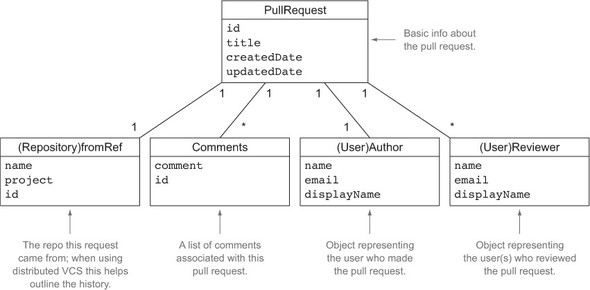
Speaking of pull requests, the typical structure for them is shown in figure 4.7.
In figure 4.7 you have the author of the pull request and a link to all the reviewers who took part in the pull request workflow. You can also get all the comments for that pull request and the history of where it came from and where it was submitted.
Commits tell you all the code that’s making it into the repo. Pull requests tell you about all the code that tried to make it into the repo. Pull requests are essentially a request to put code into the repo, and by their nature they’re much richer in data than commits. When a user submits a pull request, they ask their peers for comments, reviews, and approval. The data that is generated from the pull request process can tell you not only who is working on what and how much code they’re writing but also who is helping them and how much cooperation is going on across the team.
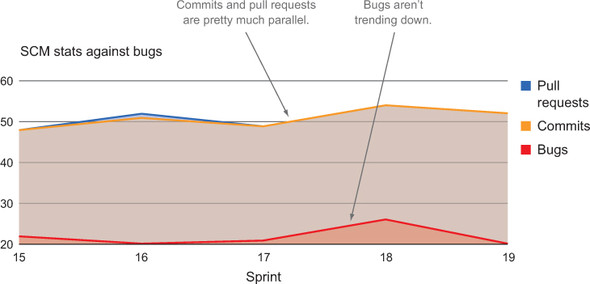
After discussing the issue, the team decided to try out the pull request workflow. They were already using Git, but the developers were committing their code to a branch and merging it all into the master before cutting a release. They decided to start tracking commits, pull requests, and bugs to see if using pull requests decreased their bug count. After a few sprints they produced the graph shown in figure 4.19.
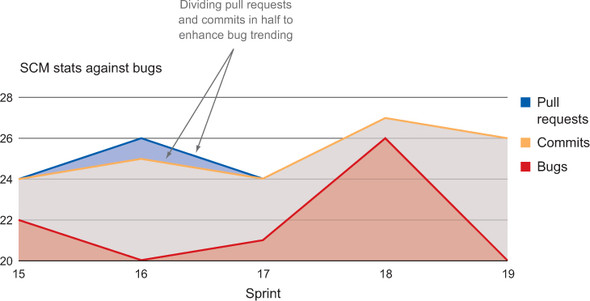
To make trends a bit easier to see, we divided the pull requests and commits by two so there wasn’t such a discrepancy between the metrics. The result is shown in figure 4.20.
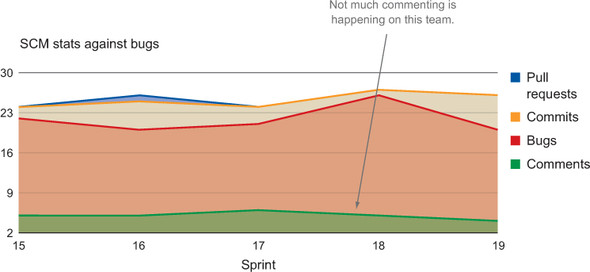
That makes it a lot easier to see the variance. As you can tell from figure 4.20, there wasn’t much change. Even though there’s a big dip in bugs from sprint 18 to 19, bugs weren’t decreasing over time; there was just a big jump in bugs in sprint 18. After discussing the situation, the team decided to add more data points to the mix. To see how much collaboration was happening in the pull requests, they began adding comments to their graphs. That resulted in the chart shown in figure 4.21. To keep things consistent, we divided comments by two.
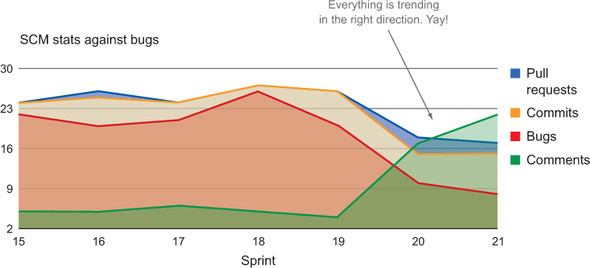
Figure 4.21 shows that there weren’t many comments along with the pull requests, which implies there wasn’t much collaboration going on. Because the bug trend wasn’t changing, it looked like the changes to their process weren’t having any effect yet. The workflow itself wasn’t producing the change the development team wanted; they needed to make a bigger impact on their process. To do this they decided that developers should act like the QM team when they were put on a pull request. The perspective they needed wasn’t just “is this code going to solve the problem?” but “is this code well built and what can go wrong with it?” There was some concern about developers accomplishing less if they had to spend a lot of time commenting on other developers’ code and acting like the QM team. They moved one of their QM members over to the development team as a coach, and the team agreed that if this would result in fewer bugs then the effort spent up front was time well spent. They started taking the time to comment on each other’s code and ended up iterating quite a bit more on tasks before checking them in. A few sprints of this process resulted in the graph shown in figure 4.22.
Figure 4.22 shows that as collaboration between development and quality increased—in this case shown through comments in pull requests—the number of bugs went down. This was great news for the team, so they decided to take the process one step further. The development managers brought in another member of the QM team to work with the developers on code reviews and quality checks to avoid throwing code over the wall to the whole QM team.

This is an excerpt from Manning's book Git in Practice.
In these cases they may send me commits through a pull request (discussed later in section 10.1) or by email. If I want to include these in my repository, the separation between committing and authoring means I can then include these commits, and Git stores the person who, for example, made the code changes and the person who added these changes to the repository (hopefully after reviewing them). This means you can keep the original attribution for the person who did the work but still record the person who added the commit to the repository and (hopefully) reviewed it. This is particularly useful in open source software; with other tools, such as Subversion, if you don’t have commit access to a repository, the best attribution you could hope for would be something like “Thanks to Mike McQuaid for this commit!” in the commit message.
GitHub provides more than just Git hosting that you can git push to and git fetch from; it also provides features that allow teams of individuals to collaborate on software projects in ways beyond those provided by Git itself. Two of these features are pull requests and forks. In this chapter you’ll learn about GitHub’s pull requests.
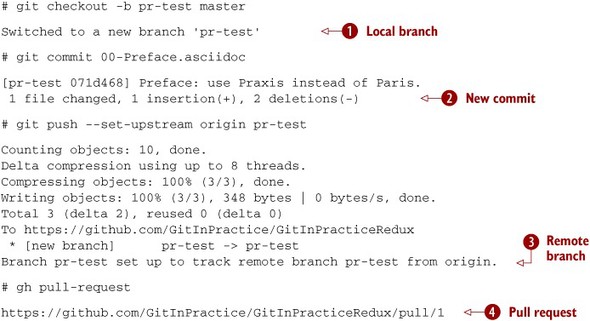
To create a PR, you need to create a local branch of the changes you want to be merged into another branch (master, by default), push the local branch to a remote branch, and use gh to create a pull request.
Listing C.1. ~/.gitconfig
[include] path = ~/.gitconfig-user [color] # Colour terminal command output when possible. ui = auto [gist] # Open GitHub Gist in browser after submission. browse = true [push] # Push to the set upstream branch being tracked by default. default = simple [fetch] # Always prune when fetching (and pulling). prune = 1 [rerere] # Store and re-use manual conflict resolution changes. enabled = 1 [core] # Exclude everything this file. Used for general exclusions. excludesfile = ~/.gitignore # Set attributes on files. Used for general diff improvements. attributesfile = ~/.gitattributes [help] # Open Git help pages in the browser as HTML. format = web autocorrect = 1 [alias] ## 'New' Commands # Stage the changes in a given file. stage = !git add -u # Unstage the changes in a given file. unstage = reset HEAD -- # View the current changes in the staging area. staged = diff --cached # Print the name of the current branch. current-branch = symbolic-ref --short HEAD # Print the name of the current upstream tracking branch. upstream = !git config --get branch.$(git current-branch).remote \ || echo origin # Cherry-pick a commit with your signature. sign = cherry-pick --signoff # List all current SVN externals for this repository. svn-externals = !git svn show-externals | grep -x \\"[^#].*\\" # Create a git:// server of the current repository. # WARNING: this gives all users read/write access # without authentication (so only use on trusted networks). serve = !git daemon --reuseaddr --export-all --base-path=. \ --verbose ./.git # Merge a branch and commit a merge commit (even if one # isn't needed) noff = merge --no-ff # Merge a branch with a merge commit and resolve any conflicts # always using that branch's version rather than the current branch. theirs = !git noff -Xtheirs # Fetch all branches and rebase the current branch against # upstream/master. rebase-against-master = !git fetch --all \ && git rebase $(git upstream)/master # Push the current branch upstream to origin using the same branch # name for the remote branch. upstream-current-branch = !git push --set-upstream origin \ $(git current-branch) # Create a pull request on GitHub using the `gh` command. pull-request = !git upstream-current-branch && gh pull-request # Upstream the current branch to origin and create a pull request # on GitHub. upstream-and-pull-request = !git upstream-current-branch \ && git pull-request # Get the current diff but show differences between characters # instead of just the differences between lines. word-diff = diff --word-diff # Push the current branch and set it as the default upstream branch. push-and-set-upstream = push --set-upstream # Create a new branch by checking out another branch. checkout-as-new-branch = checkout -b # Rebase against origin/master and prompt for what operations # should be performed. interactively-rebase-against-origin-master = \ !git rebase --interactive origin/master # Show the commit log with a prettier, clearer history. pretty-one-line-log = log --graph --oneline --decorate # Commit any changes to files, squash them into the last commit # and update its date. fix-up-previous-commit = !git commit --all --amend \ --reuse-message=HEAD --date=\"$(date)\" #" # Checkout the staging branch and update it. pull-staging = !git checkout staging && git pull # Checkout the master branch and update it. pull-master = !git checkout master && git pull # Update the staging, master and current branches. pull-master-staging-and-current-branch = \ !BRANCH=$(git current-branch) && git fetch --all \ && git pull-staging && git pull-master && \ git checkout $BRANCH && git pull # Commit a work-in-progress commit (to use with # fix-up-previous-commit) work-in-progress = commit -a -m 'WIP' # Merge a branch with a merge commit and use the more time-consuming # patience diff algorithm patience = !git noff -Xpatience # Hard reset branch to the upstream version. hard-reset = !git reset --hard $(git upstream)/$(git current-branch) # Assume the specified file is unchanged to stop changes # being seen by Git assume = update-index --assume-unchanged # No longer assume a specified file remains unchanged unassume = update-index --no-assume-unchanged # List all files that are assumed to be unchanged assumed = !git ls-files -v | grep '^[hsmrck?]' | cut -c 3- ## Shortened 'New' Commands fahr = !git fetch --all && git hard-reset rem = !git rebase-against-master wip = !git work-in-progress pr = !git upstream-and-pull-request up = !git upstream-current-branch pm = !git pull-master-staging-and-current-branch fa = !git fetch --all w = !git word-diff u = !git push-and-set-upstream b = !git checkout-as-new-branch i = !git interactively-rebase-against-origin-master # `true` needed as the return status is wrong otherwise. l = !git pretty-one-line-log || true f = !git fix-up-previous-commit ## Shortened Existing Commands p = pull s = status --short --branch [instaweb] # Use the Ruby WEBRick library when creating a `git instaweb` # HTTP server. httpd = webrick [diff] # Use the OS X graphical three-way merge tool for graphical diffs. tool = opendiff # Use the slower but better patience diff algorithm algorithm = patience [diff "xml"] textconv = xmllint --format --recover [difftool "opendiff"] # Set the OS X opendiff command name. path = opendiff [merge] # Use the OS X graphical three-way merge tool for graphical merges. tool = opendiff [mergetool] # Don't prompt before opening the merge tool. prompt = false # Don't keep backups of the merge tool inputs. keepBackup = false # Don't keep the merge tool temporary input/output files. keepTemporaries = false [mergetool "opendiff"] # Use a script to setup opendiff correctly for Git merges. path = git-mergetool-opendiff [apply] # Cleanup whitespace by default when apply patches. whitespace = fix [url "git@github.com:"] # Always use GitHub SSH protocol to push. # Allows use of git:// for public repositories with push access pushInsteadOf = git://github.com/ [url "https://github.com/"] # Use HTTP for GitHub instead of git:// or git@ # Enable this in networks where git:// or git@ are blocked. #insteadOf = git://github.com/ #insteadOf = git@github.com: [url "git@github.com:"] # Use SSH for GitHub instead of https:// # Enable this in networks where https:// has issues. #insteadOf = https://github.com/ [url "git@gitorious.org:"] # Always use Gitorious SSH protocol to push. # Allows use of git:// for public repositories with push access # (which is often faster). pushInsteadOf = git://gitorious.org/ [credential] # Use OSX Keychain to store HTTP passwords. helper = osxkeychain [filter "media"] clean = git-media-clean %f smudge = git-media-smudge %f [gh] protocol = https